
If your site is starting to strain the limits of a traditional host, moving to cloud web hosting is the simplest way to gain speed, stability, and room to grow. Instead of relying on a single physical machine, cloud hosting spreads your site across a pool of virtual servers—delivering higher uptime, on-demand scalability, and better resilience during traffic spikes or hardware hiccups.
This guide breaks down how cloud hosting works, how it differs from other hosting types, and who it’s best for. I also reviewed the top cloud hosting providers for 2026 so you can confidently choose the right fit for your needs and budget.
Best Cloud Hosting Services in 2026
- Kamatera – Best for flexible, low-cost infrastructure you can fine-tune
- Cloudways – Best fully managed cloud hosting with deep customization
- Atlantic.Net – Best for Compliance-Ready Cloud Hosting
- HostGator – Best budget-friendly cloud hosting for beginners
- Scala Hosting – Best for tailored resource allocation and price control
- Hostinger – Best overall value for performance per dollar
- DreamHost – Best for developers and advanced projects
- SiteGround – Best for fast, click-to-scale resources
- InMotion – Best for growing small businesses
Keep reading for detailed reviews—covering pricing models, core features, and standout strengths—so you can match the right provider to your traffic, workload, and growth plans.
Cloud hosting works differently than shared hosting, VPS hosting, or dedicated servers. Each provider has its own approach to scaling and management, so the “best” choice depends on your use case.
After the reviews, you’ll find a concise buying guide that shows exactly how to compare plans based on performance, reliability, and total cost.
Kamatera — Best for Affordable Versatility
Kamatera delivers highly configurable cloud infrastructure for startups through enterprises. You pick the exact CPU, RAM, storage, and OS you need, launch in under a minute, and scale resources instantly as demand changes.
A full-featured 30-day trial lets you test performance and support before committing. You’ll get platform access plus 24/7 assistance and an account manager during the trial window.
What the free trial includes:
- One cloud server (up to $100 in any configuration)
- 1000 GB of outbound internet traffic
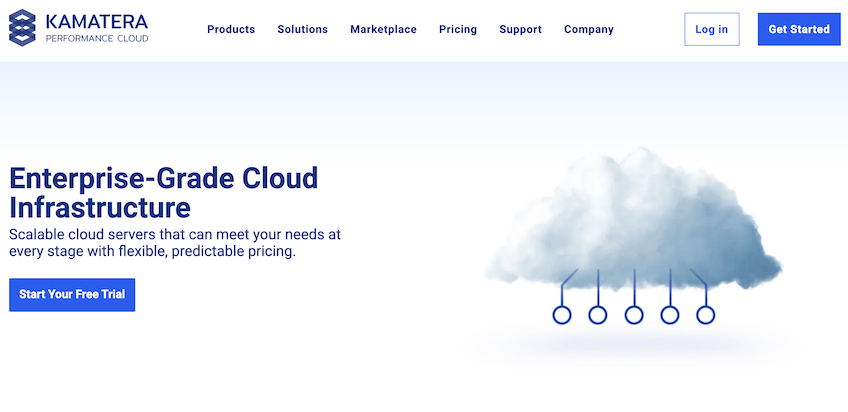
Kamatera advertises 99.95% uptime with low-latency networking, instant scaling, and a clean management console. The result is a cloud VPS experience with enterprise-grade control at small-business prices.
Its 24 global data centers span North America, Europe, Asia, and the Middle East. Facilities meet or exceed AICPA SOC 2 Type II standards, and critical components—including power and storage—are fully redundant.
Power users can choose from 60+ operating systems—including popular Linux distributions and Windows—plus custom images, fine-grained networking, and advanced firewall rules.
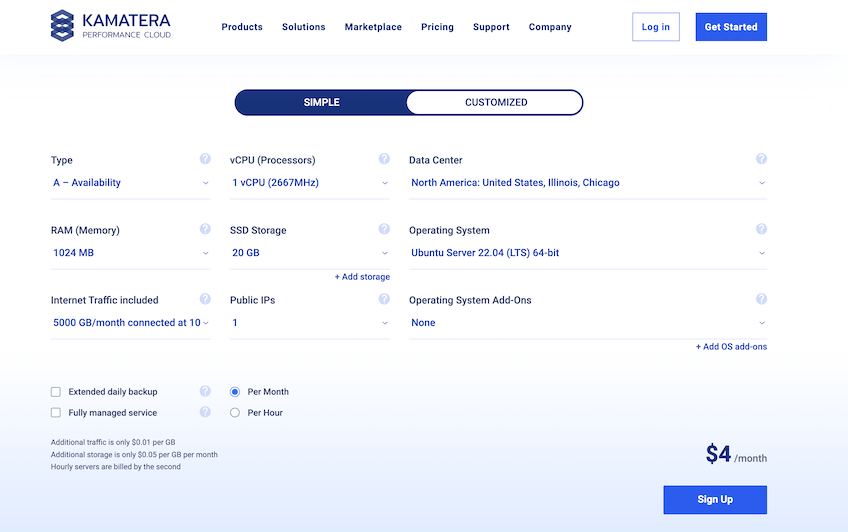
Kamatera isn’t the most beginner-friendly pick—there’s no drag-and-drop site builder, and cPanel is a paid add-on—but the dashboard is straightforward and 24/7/365 support is responsive. If you prefer a hands-off approach, fully managed services are available for an extra fee.
Highlights you get with Kamatera’s cloud VPS:
- Spin up servers in under 60 seconds
- Guaranteed 99.95% uptime
- Real-time scaling of CPU, RAM, storage, and networking
- 60+ OS options (Windows, Linux, Ubuntu, Debian, FreeBSD, CentOS, and custom images)
- Intuitive console with advanced firewall and disaster-recovery tooling
There’s no shared hosting or domain registration, but free SSL is included on every server. Pricing is transparent and usage-based—you only pay for what you consume, and you can add or remove resources instantly from the dashboard.
Current Kamatera pricing snapshots:
- Cloud Servers: from $4/month or $0.005/hour
- Block Storage: $0.05/month per GB
- Private Cloud Network: Free
- Load Balancer: from $9/month
- Cloud Firewall: from $9/month
- Managed Services: from $50/month per server
Choose Kamatera if you want deep control, global coverage, and minute-level scalability at a low cost. With the 30-day free trial, you can validate performance before you migrate.
Cloudways — Best Customizable Managed Cloud Hosting
Cloudways gives you the performance of DigitalOcean, AWS, or Google Cloud with the simplicity of a fully managed platform. It handles server setup, patching, caching, security hardening, and performance tuning—so you can focus on building, not babysitting servers.
Deployment is fast: launch WordPress, Magento, Joomla, Drupal, or a custom PHP stack in minutes. One-click staging, cloning, and backups streamline routine workflows for agencies and teams.
Supported stacks and CMS options include:
- WordPress
- Magento
- Drupal
- Joomla
- Prestashop
- MediaWiki
- Koken
- PHP Stack
Pricing depends on your underlying cloud provider, data center, and chosen resources. It’s pay-as-you-go with monthly caps available, so you only pay for what you use. Starter bundles now begin around $11/month on DigitalOcean, and you can still take a 3-day free trial without a credit card.
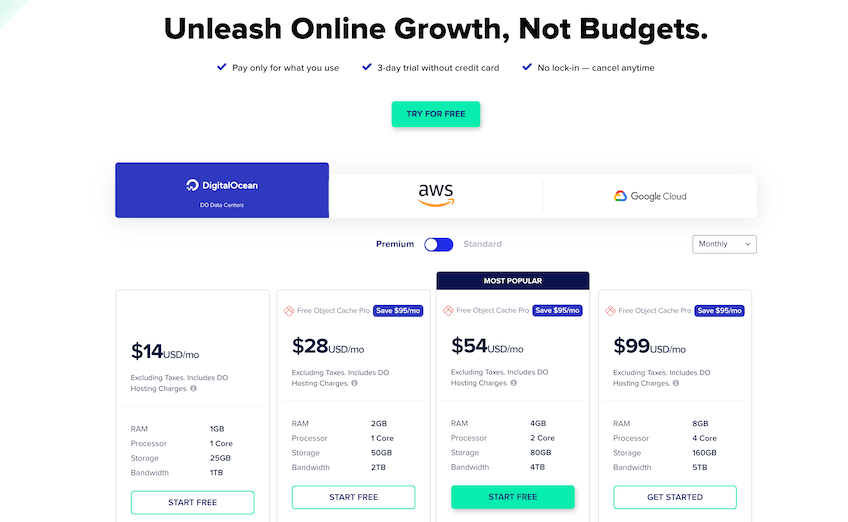
All plans include:
- Free SSL certificates
- Unlimited application installs
- Server-level caching (Varnish, Memcached, Nginx) and Redis support
- Automated daily backups
- Optional built-in CDN via Cloudflare integration
- Real-time server monitoring (15+ metrics)
- One-click staging and app cloning
Security is robust: two-factor authentication, IP whitelisting, platform firewalls, bot protection, and isolated app environments.
Optional add-ons include Rackspace email, Gmail SMTP, white-glove migrations, and extended monitoring. Try a three-day free trial (no card needed).
Atlantic.Net — Best for Compliance-Ready Cloud Hosting

Atlantic.Net delivers high-performance cloud servers with a strong emphasis on security, compliance, and reliability. If you’re in a regulated industry—like healthcare, finance, or ecommerce—and need cloud infrastructure that’s already aligned with PCI and HIPAA requirements, this is one of the strongest options on the market.
Cloud servers spin up in about 30 seconds, and you can choose from general purpose, compute-optimized, memory-optimized, and storage-optimized plans. Every plan runs on audited, enterprise-grade infrastructure with a 100% uptime SLA for critical components and always-available support from U.S.-based experts.
Atlantic.Net also stands out for its free tier: you can run a G3.8GB cloud server free for one year, plus get 50 GB of block storage and 50 GB of snapshot capacity included. That’s plenty of room to test workloads, staging sites, or proof-of-concept apps without touching your budget.
Highlights you get with Atlantic.Net cloud hosting:
- Compliance-ready infrastructure: Data centers audited to SOC 2 Type II and SOC 3 Type II standards, with PCI- and HIPAA-ready environments for sensitive workloads.
- 100% uptime SLA: Cloud servers backed by a 100% uptime service-level guarantee on critical infrastructure, so you’re not guessing about reliability.
- Flexible plan families: General purpose, compute-optimized, memory-optimized, and storage-optimized instances so you can tune cost vs. performance.
- Free tier for one year: G3.8GB cloud instance plus 50 GB of block storage and 50 GB of snapshots at no cost for the first year.
- Global regions: Data centers across the U.S., plus locations in Canada, the UK, and Singapore for low-latency access.
- Managed services available: Optional managed firewalls, backups and replication, migration help, and ongoing server management.
Pricing is transparent, with on-demand hourly billing and discounts for one- and three-year terms. For example, general-purpose G3 plans for Linux start around $10 per month for 2 GB RAM, 1 vCPU, 50 GB SSD storage, and 3 TB of transfer, with larger instances scaling up RAM, CPU cores, and storage for heavier workloads.
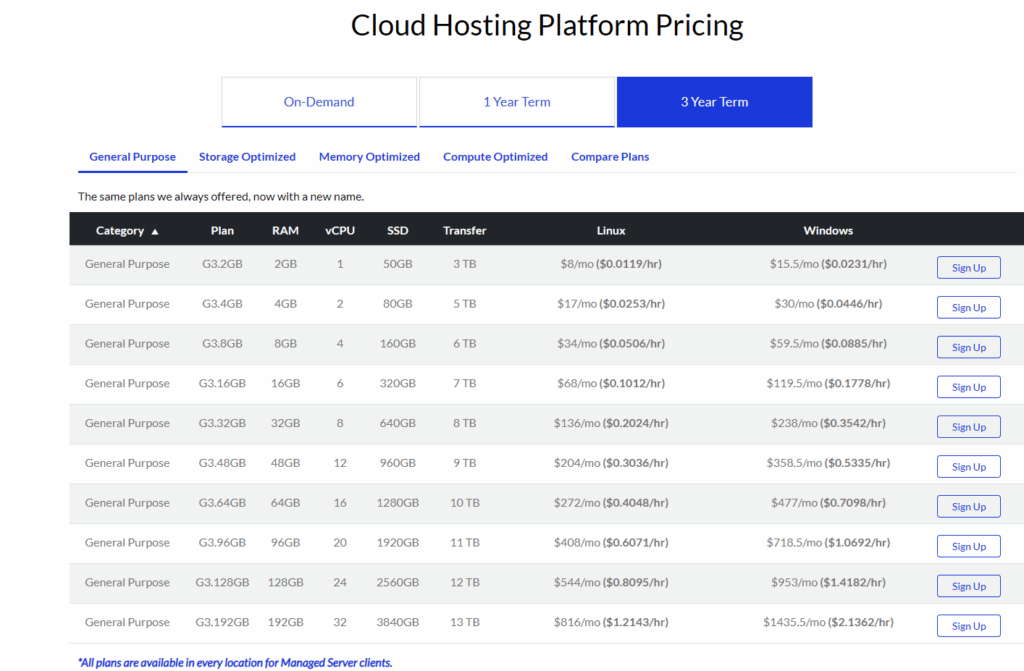
If you need cloud performance but can’t compromise on compliance and uptime guarantees, Atlantic.Net is a smart addition to your shortlist.
HostGator — Best Cheap Cloud Hosting
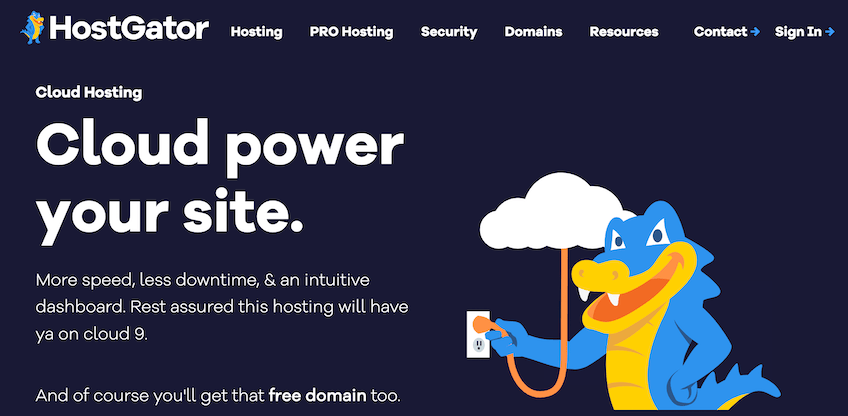
HostGator is a budget-friendly way to tap into cloud hosting. It pairs straightforward pricing with beginner-friendly tools, making it a great first step beyond shared hosting.
All cloud plans include a free SSL, a free domain for the first year, cPanel access, local caching, and unmetered bandwidth. You’ll also get unlimited email accounts and $200 in advertising credits. A 99.9% uptime guarantee backs every plan.
Plan lineup:
Hatchling Plan
- Starts at $4.95/month (promotional rate)
- 2 CPUs
- 2 GB RAM
- Single domain
Baby Plan
- Starts at $6.57/month (promotional rate)
- 4 CPUs
- 4 GB RAM
- Unlimited domains
Business Plan
- Starts at $9.95/month (promotional rate)
- 6 CPUs
- 6 GB RAM
- Unlimited domains
These intro prices reflect a 36-month term and renew at standard rates, so plan your budget accordingly. The Business tier also adds a dedicated IP and an upgraded Positive SSL.
For a deeper dive, see my full HostGator review. Or start with HostGator Cloud—plans include a 30-day money-back guarantee.
Scala Hosting — Best for Custom Resource Allocation

Scala Hosting blends VPS power with cloud flexibility. Unlike rigid bundles elsewhere, Scala lets you pre-size CPU, RAM, and NVMe storage to perfectly match your workload—so you never pay for capacity you won’t use (or outgrow too soon).
Pre-built managed cloud VPS plans start at $14.95/month, but the real value is the “build-your-own” option for precise control over performance and cost.
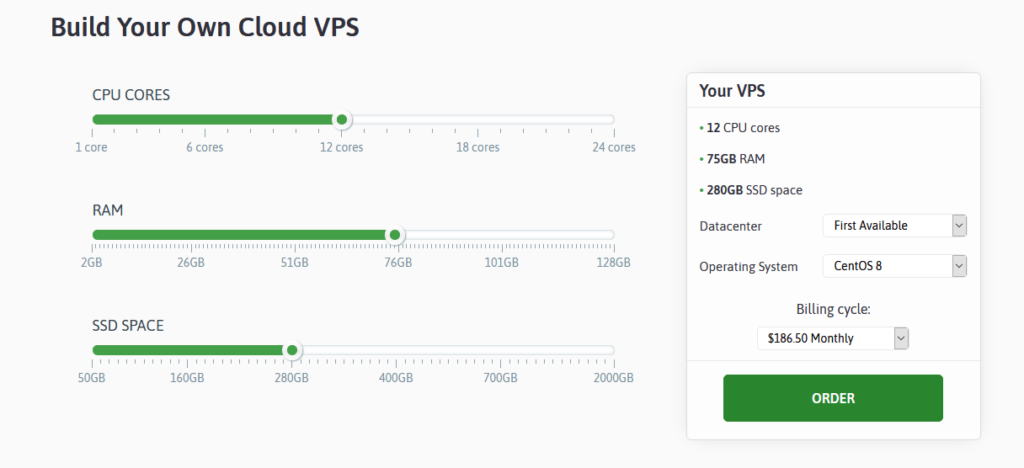
Use simple sliders on the cloud VPS page to set your configuration. Resource minimums and maximums vary by managed vs. self-managed options.
Entry managed plans include 2 CPU cores, 2 GB RAM, free domain, real-time malware protection, and OpenLiteSpeed caching from $14.95/month.
Self-managed plans are fully customizable. Sample pricing:
- From $20/month for 2 CPU cores, 4 GB RAM, 50 GB NVMe SSD
- Add CPUs at $6/month each (up to 24 cores)
- Add RAM at $2/month per GB (up to 64 GB)
- Add storage at $1/month per 10 GB (up to 460 GB)
Optional extras include LiteSpeed licenses, WHMCS, and cPanel (for unmanaged servers). You choose your data center and control panel (managed) or OS (unmanaged), and migrations are free to minimize downtime.
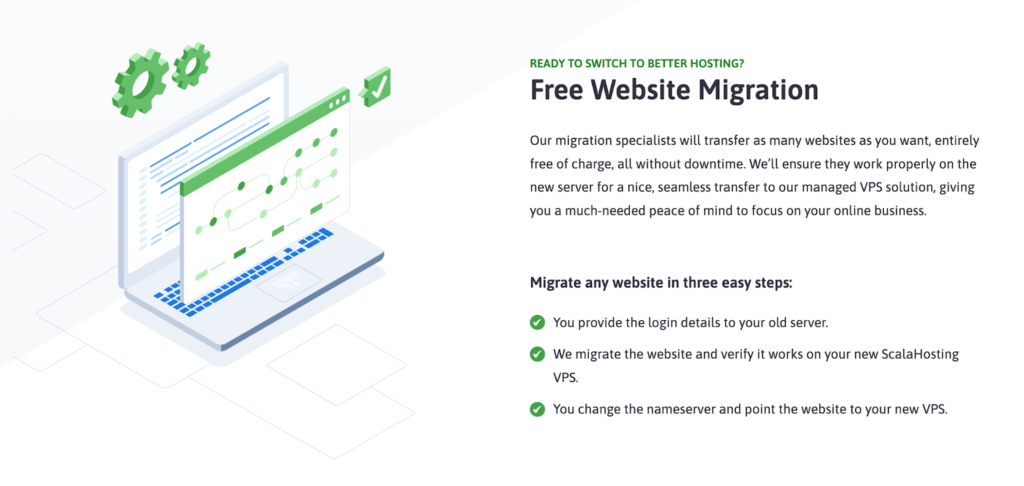
Pick Scala Hosting if you want granular control over resources and billing, especially when your performance profile doesn’t fit cookie-cutter plans.
Even as you scale, Scala stays price-competitive and unusually flexible compared with similar providers. If you want custom-built performance, Scala Hosting is an excellent choice.
Hostinger — Most Bang for Your Buck
Hostinger consistently delivers top-tier performance for the price. Cloud plans now start as low as $7.49/month with a 48-month commitment, letting you lock in a low rate while getting generous resources and strong security.
You can host up to 300 websites on a single account, and every plan comes with a dedicated IP, automatic daily backups, and managed services. Hostinger backs this with a 99.9% uptime guarantee and fast global performance.
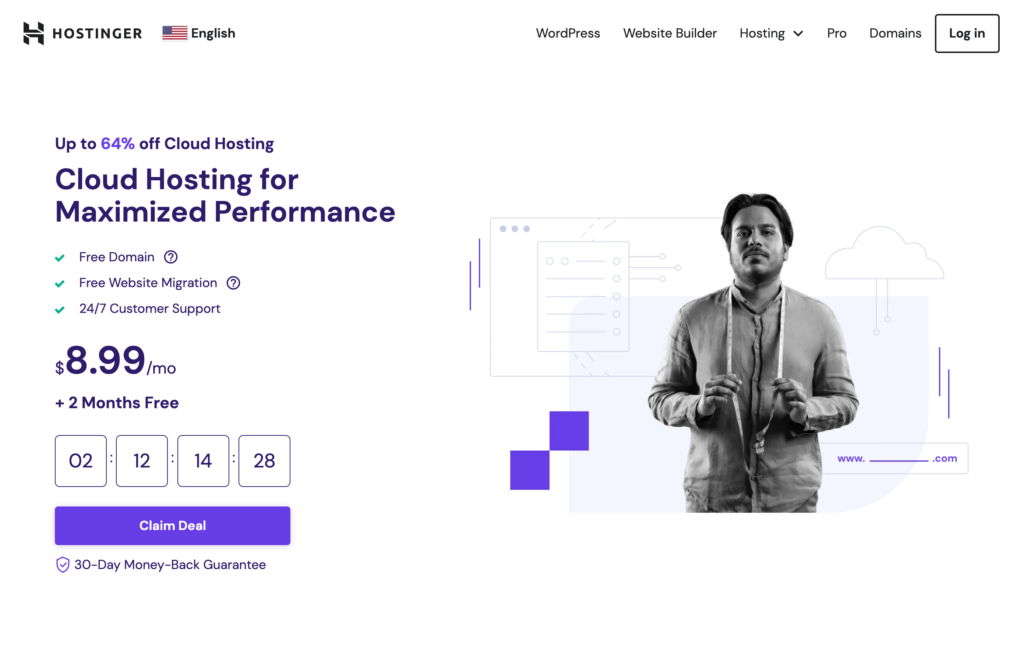
All cloud plans are fully managed: Hostinger handles maintenance, monitoring, and backups. You also get a free domain, unlimited bandwidth, and a dedicated IP. Support is 24/7 via live chat.
Hostinger’s hPanel is simpler than cPanel but still powerful, with one-click installs, resource monitoring, and direct file access. It’s ideal if you want speed and stability without the learning curve.
Plan overview:
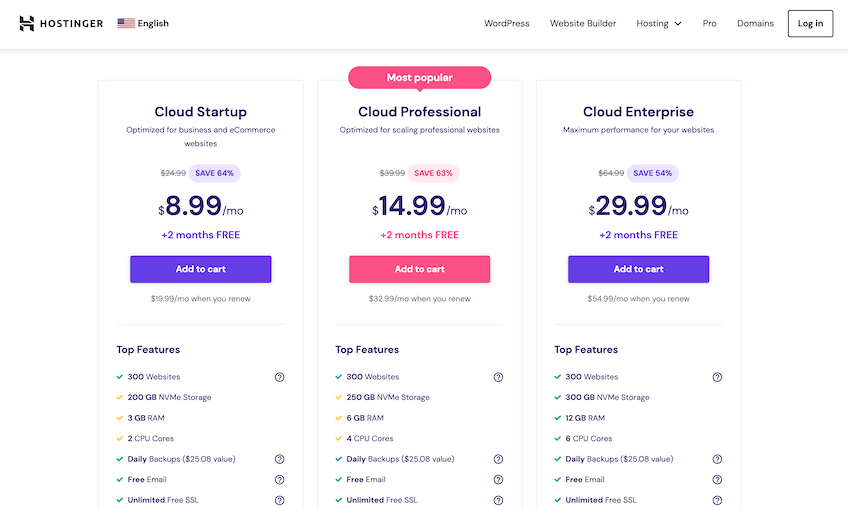
The entry Cloud Startup plan begins with deep intro pricing and renews at standard rates after your term ends. Compared to similar budget options, Hostinger typically offers more RAM, stronger security, and a free dedicated IP—making it a standout value.
If it’s not the right fit, there’s a 30-day money-back guarantee. Try Hostinger Cloud risk-free.
DreamHost — Best for Developer Projects

DreamHost can have instances live in under 30 seconds, making it ideal for spinning up dev/test environments, containerized apps, databases, or custom web stacks. It’s built for technical users who want full control rather than a managed experience.
Two core offerings cover most needs:
- DreamCompute – Flexible cloud compute for sites, apps, and staging (hourly billing capped at 600 hours/month).
- DreamObjects – Scalable object storage for backups, media, and WordPress archives.
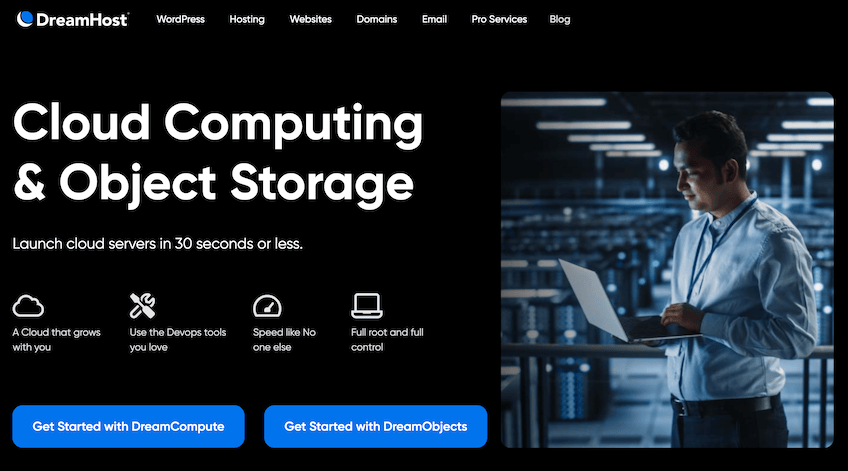
Usage-based billing charges by the hour with a monthly cap—perfect for short-lived environments. Example DreamCompute pricing:
- 512 MB RAM — $0.0075/hour (max $4.50/month)
- 2 GB RAM — $0.02/hour (max $12/month)
- 8 GB RAM — $0.08/hour (max $48/month)
DreamObjects starts at $0.025/GB per month for storage and $0.05/GB for downloads, with a 60-day free trial to validate your workflow.
You get root and SSH access with compatibility for standard DevOps tooling.
For low-cost, flexible cloud with maximum control, DreamCompute and DreamObjects are hard to beat.
SiteGround — Best for Scaling Resources
SiteGround runs on Google Cloud infrastructure and is built for growing sites that need predictable performance and click-to-scale resources. It’s fully managed, with autoscaling, daily backups, proactive monitoring, and advanced caching.
Adding CPU or RAM is instant from the admin panel—no tickets or downtime. This makes SiteGround a strong pick for ecommerce, high-growth startups, and media-heavy sites that see traffic swings.
Performance leans on the SG Optimizer plugin, NGINX, dynamic caching, HTTP/3, and SiteGround’s custom PHP implementation for faster execution. You also get a global CDN, free SSL, and data centers across North America, Europe, Asia, and Australia.
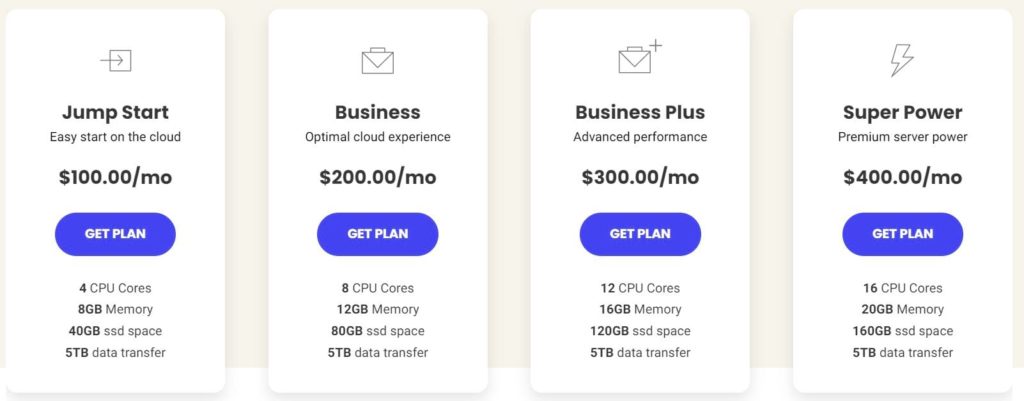
Business and Business Plus are the sweet spots for most midsize sites. As traffic climbs, you can scale resources with a few clicks and keep performance steady.
If you want a managed cloud that handles the heavy lifting while staying fast and reliable, SiteGround is an excellent option. See my full SiteGround review for plan details and benchmarks.
InMotion — Best Cloud Hosting for Small Businesses

InMotion Hosting offers developer-friendly cloud VPS tailored to small businesses ready to graduate from shared hosting. Choose managed or unmanaged plans, all with root access, NVMe SSDs, free SSL, and painless scaling.
Unmanaged cloud VPS remains an affordable entry point for technical teams that want power without enterprise complexity. Managed cloud VPS adds cPanel, server management, and 24/7 monitoring. All plans include DDoS protection, automated snapshots, dedicated IP, and a generous 90-day money-back guarantee. Support is available 24/7 by chat, phone, and email.
For growing sites that need speed and control without breaking the bank, InMotion Hosting is an easy recommendation.
How to Find the Best Cloud Hosting Plan For You
Cloud plans vary widely in performance, management level, and cost. Use the checklist below to compare apples to apples and avoid paying for features you don’t need.
Scalable Resources
Look for flexible CPU, RAM, and storage you can adjust without downtime. New sites shouldn’t overbuy just to be “safe”—the right cloud lets you scale up (or down) when the data says you need it.
Because cloud environments draw from a pooled infrastructure, you’re not bottlenecked by a single machine. If one node hits its limits, healthy nodes take the overflow automatically.
Prioritize hosts that let you change resources from your dashboard in real time, without opening tickets.
Here’s how it looks on HostGator Cloud, one of my featured picks:
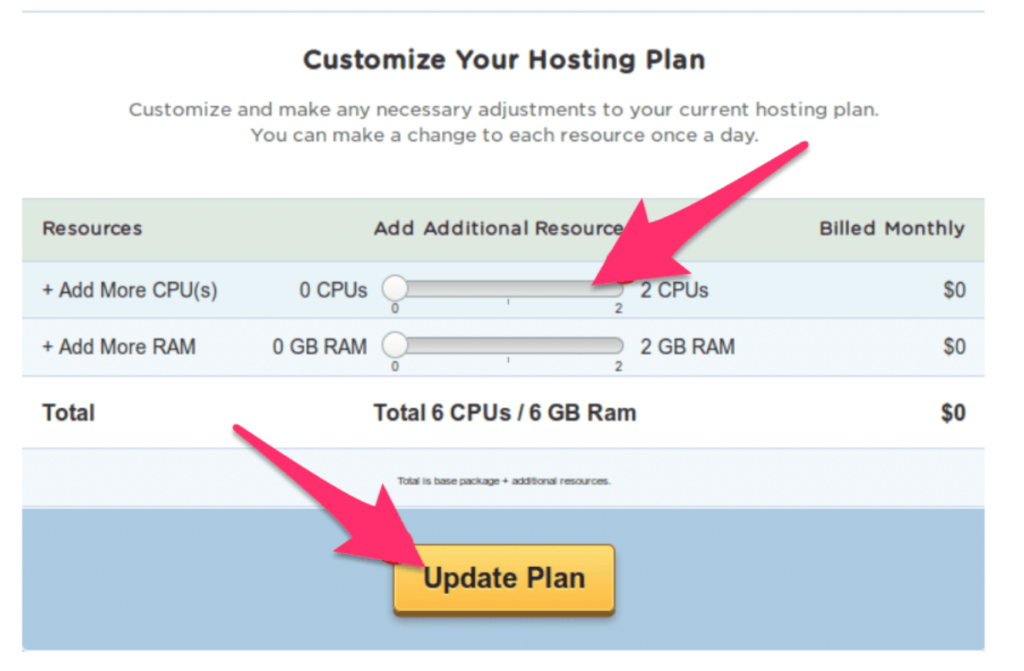
Bottom line: choose plans that scale with zero downtime and minimal manual steps.
Price
Traditional plans charge a flat monthly fee whether you use 10% or 90% of your resources. Cloud pricing often tracks actual usage—great for sites with seasonality or campaigns.
Think of it like à la carte versus a buffet: you can cap spend at a maximum or pay only for what you consume. Many providers also set monthly ceilings so a surge doesn’t explode your bill.
Here’s an example from DreamHost, which bills by usage with monthly caps:
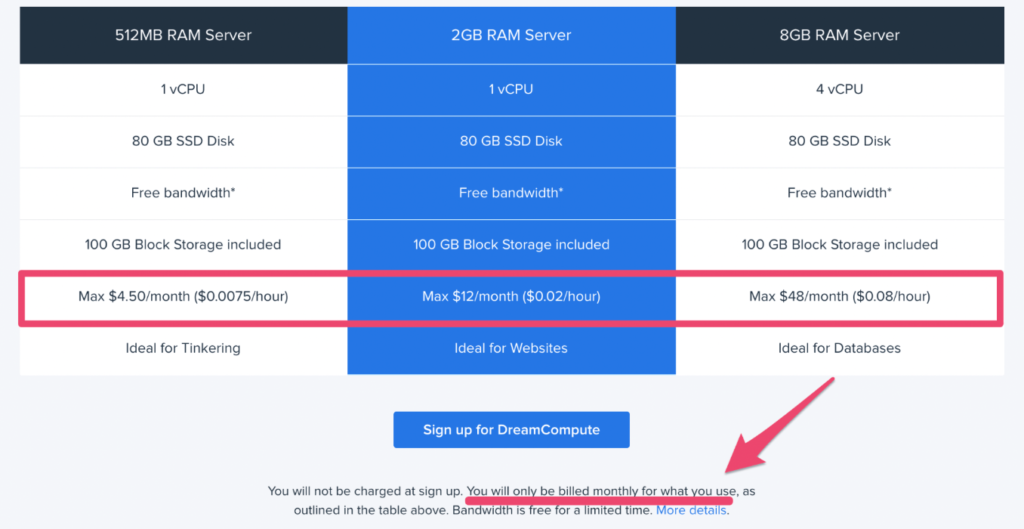
Usage caps give you room to scale during peaks while keeping spend predictable.
Speed and Performance
Uptime and page speed are non-negotiable. Cloud hosting improves performance by distributing load across multiple nodes and letting you place resources near your audience.
For global reach, pick a provider with multiple regions and an integrated CDN. Users simply experience a fast site—and speed directly impacts SEO and conversions.
Cloud is an easy way to stay fast during campaigns and spikes without overprovisioning all year.
Security
Website security should be layered—DDoS protection, malware scanning, automated backups, and account isolation are table stakes. Cloud’s distributed design also reduces single-point-of-failure risk.
In single-server environments, an outage can take everything down. With cloud, traffic routes around issues to keep you online.
Verify backup frequency and retention policies, and confirm how restores work before you need them.
Technical Expertise
Cloud works for both beginners and developers; the key is choosing the right management level. Unmanaged plans (like DreamHost compute or Hosting.com’s unmanaged VPS) give full control. Managed plans handle setup, updates, and monitoring for you.
If you don’t want to touch server settings, pick a fully managed platform and focus on your site and content.
Frequently Asked Questions
Kamatera is the best cloud web hosting plan for most websites due to its flexibility and scalable resources at an affordable price. They guarantee a 99.95% uptime rate, and you can choose from over 60 operating systems to power your cloud servers. Kamatera is fast, reliable, and has exceptional 24/7 customer support. They even offer fully-managed cloud hosting plans for site owners who prefer to stay hands-off. Plans start at $4 per month, and you can try it free for 30 days.
The average cost of cloud hosting is about $10 per month. On the low end, you can find cloud hosting plans starting from $5 to $15 per month. High-end cloud hosting plans can start around $100 or more per month.
Cloud hosting is better than shared hosting for websites that want flexible resources and better performance. If a cloud server goes down or has problems, the other servers on your cloud network will keep your site running smoothly—even as traffic scales. While cloud hosting is more expensive than shared hosting, there are still plenty of affordable entry-level plans that make it a viable option for new websites and growing websites. Shared servers don’t give you the same options for on-demand resource allocation, and there’s a higher chance of performance issues when traffic spikes.
Cloud web hosting is very secure because the infrastructure runs on virtual machines that are isolated from each other. If one cloud machine is compromised, it won’t impact other sites on the same network. Since cloud hosting is remote, websites are also protected from potential security flaws with physical servers. Websites hosted in the cloud can stay up and running securely, even if a remote server is hacked or compromised.
Cloud web hosting is very reliable because it uses multiple servers across a cloud network. So if one server fails or goes down, the other servers on the cloud network can make up for it without an interruption in service. Websites relying on cloud web hosting will benefit from higher uptime rates and fewer outages from unexpected server issues. This is much more reliable than shared web hosting and even dedicated server hosting, where a single point of failure can cause an outage.
Cloud hosting distributes your website’s compute, memory, and storage across multiple virtual servers rather than a single physical box. That pooled capacity keeps your site responsive even when one machine is busy or offline. Different nodes handle different processes. If one fails or gets overloaded, traffic is automatically rerouted to healthy nodes—so your site stays up and fast. This redundancy is the core reason cloud hosting outperforms traditional single-server setups. With other hosting types, your site typically lives on a single server (shared with others or dedicated to you). If that server crashes, you’re down. In the cloud, the infrastructure is virtualized and spread out—so other nodes seamlessly take over.
Cloud hosting delivers higher uptime, smoother performance during spikes, and the ability to scale resources on demand—often with billing that tracks actual usage. It’s also fast to deploy. Most cloud environments can be provisioned in minutes, which is useful for launches, seasonal campaigns, or test environments.
Key advantages include:
– Scalable bandwidth and compute: Ramp up CPU, RAM, and throughput for busy seasons, product launches, or viral traffic—then scale back to save money.
– Usage-based pricing: Many providers bill by what you actually consume (with optional caps), so you’re not stuck paying for idle capacity.
– Reduced downtime risk: Cloud architecture reroutes traffic to healthy nodes when issues occur, minimizing outages.
– Global reach: With multiple regions and built-in CDNs, users get content from the closest location for faster loads.
For growing sites and online businesses, the comb
Choose cloud hosting if you expect growth, see traffic spikes, or can’t afford downtime. It’s ideal for ecommerce, SaaS, content sites with viral traffic, membership platforms, and apps that run background jobs or APIs. If you run a small blog, portfolio, or hobby site with low, steady traffic, a quality shared plan is usually cheaper and sufficient. When growth arrives—or you need better speed and uptime—upgrading to the cloud is a cost-effective next step. Compared to VPS, cloud adds redundancy and easier horizontal scaling. For total hardware control, dedicated servers still win—but they lack the elasticity and geographic reach of the cloud. As a rule of thumb: once you pass ~50,000 monthly visitors, run revenue-critical workloads, or anticipate spikes, it’s time to consider cloud hosting.
Best Cloud Hosting Services in 2026
Choose the right fit for your needs and budget.
- Kamatera – Best for flexible, low-cost infrastructure you can fine-tune
- Cloudways – Best fully managed cloud hosting with deep customization
- Atlantic.Net – Best for Compliance-Ready Cloud Hosting
- HostGator – Best budget-friendly cloud hosting for beginners
- Scala Hosting – Best for tailored resource allocation and price control
- Hostinger – Best overall value for performance per dollar
- DreamHost – Best for developers and advanced projects
- SiteGround – Best for fast, click-to-scale resources
- InMotion – Best for growing small businesses