
Nextiva is a dependable cloud-based virtual phone number provider and unified communications platform for small and midsize businesses. It combines a modern cloud phone system with voice, SMS/MMS, team chat, video meetings, and analytics—now with growing AI-powered automation—backed by responsive, knowledgeable support.
It’s easy to learn yet powerful enough for fast-growing and multi-location teams in 2025. Compared to similarly priced VoIP and UCaaS options, Nextiva delivers strong value for small and midsize businesses that want predictable costs, modern collaboration tools, and reliable performance without stitching together multiple point solutions.
Nextiva Pros and Cons
Pros
- Unlimited domestic calling on most plans
- High reliability with strong call quality and uptime (backed by carrier-grade infrastructure)
- Clean, intuitive apps for web, desktop, and mobile
- Responsive support and guided onboarding
- Built-in analytics, call recording (plan-dependent), and sentiment insights
- Support for local, toll-free, and vanity numbers, plus number porting
- Scales from simple virtual phone numbers to full cloud call center and customer experience tools
- AI-assisted automation and workflow features on higher-tier plans (e.g., smarter routing and agent insights)
Cons
- Mobile app can lag under heavy video or multitasking on older devices or weak networks
- Free trial availability varies by product (NextivaONE offers a trial; many UCaaS plans are demo/purchase-based)
- Most advanced AI and contact center features are reserved for higher-tier plans
How Nextiva Compares to Top Virtual Phone Number Companies
Nextiva competes head-to-head with leading VoIP and UCaaS providers, offering a balanced mix of calling, messaging, meetings, and reporting. While some rivals emphasize niche add-ons or deep enterprise integrations, Nextiva’s core bundle is strong for most teams and remains competitively priced—especially with annual billing or multi-seat discounts.
It’s especially well-suited to multi-location and hybrid organizations that need a centralized system for device management, identity and access control, and consistent call flows across departments. Admin tools make it straightforward to standardize greetings, routing rules, and business hours for every location, while analytics and AI features help leaders spot trends and optimize staffing.
Other top VoIP providers like RingCentral emphasize advanced enterprise features (e.g., extensive integrations and deeper out-of-the-box video and webinar options), and many include team messaging and file sharing.
Ooma focuses on simplicity with features like a virtual receptionist, call blocking, call recording, faxing, and solid mobile experiences—often appealing to very small offices and home-based businesses that don’t need robust analytics.
If you want a dependable, all-in-one platform with guided support, clear admin controls, and room to grow into more advanced automation and contact center capabilities, Nextiva is an excellent shortlist candidate.
Nextiva Toll-free Numbers
Nextiva provides toll-free numbers across the common prefixes—800, 888, 877, 866, 855, 844, and 833. Toll-free lines can increase trust, improve answer rates for nationwide campaigns, and remove cost barriers for callers.
They also help with clean campaign attribution: pair unique toll-free numbers with landing pages, ads, or mailers to track calls by source and measure ROI. Teams can spin up new numbers for specific promotions and retire them when campaigns end, using analytics to see which campaigns actually drive revenue.
Nextiva supports vanity numbers (e.g., 1-800-EXAMPLE) to boost memorability and brand recall. If your goal is national presence, toll-free plus a relevant vanity wordmark can be a smart combination.
Toll-free lines integrate with auto attendants and IVR menus so callers can self-route to the right team. That means fewer transfers, shorter wait times, and better first-call resolution—even as you add new campaigns, products, or locations.
Nextiva Extensions and Routing
Nextiva includes flexible routing so you can send calls to the right person or queue every time. Build rules by department, skill, caller input, or priority. This is especially useful for companies with multiple product lines or service tiers.
Create schedules for business hours, holidays, and after-hours handling. Set distinct greetings for each scenario, and route off-hours calls to voicemail, on-call rotations, or overflow answering services. Clear flows reduce missed calls and improve customer satisfaction.
Two common setups work well for most teams: a standard auto attendant with custom greetings and hours, and a more advanced option with skills-based or intent-based routing for high-volume teams. Both scale as you hire and are easy to adjust from the admin portal.
Pro tip: map your top five inbound intents (e.g., sales, billing, tech support, new customer, partner) and give each a distinct menu option or queue. Review recordings and analytics weekly to remove dead ends, shorten prompts, and fine-tune routing rules.
Because routing and extensions are simple to manage, Nextiva fits both lean startups and multi-site operations that need consistent call handling without heavy IT overhead.
Nextiva Setup Process
Onboarding is streamlined. Many teams can configure users, numbers, and call flows in a single afternoon—especially when using softphones and existing devices. Guided support is available if you want hands-on help or are migrating from a legacy PBX.
Typical setup flow:
- Add or port numbers (local and/or toll-free) and assign them to users or queues.
- Create auto attendants and schedules for open hours, lunch, holidays, and after-hours.
- Set up user extensions, voicemail, call forwarding, and caller ID policies.
- Install the desktop and mobile apps; verify headset and device settings.
- Test flows end-to-end: call each menu option, confirm recordings, and check analytics.
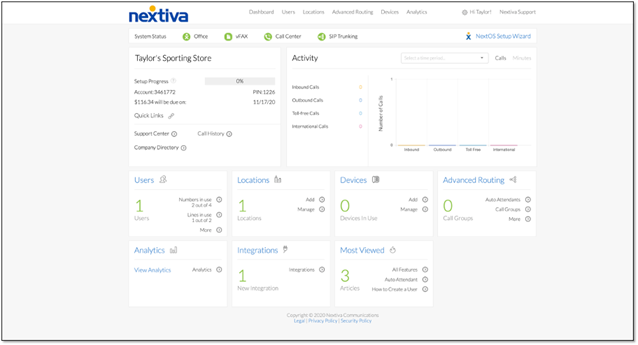
Whether you self-serve or opt for guided onboarding, the experience is straightforward and well-documented. Most changes take effect instantly, so you can iterate quickly as you refine call flows and business rules.
Nextiva Video Meetings
Nextiva’s video conferencing supports HD meetings, team huddles, and client demos without extra licenses. Host recurring meetings, invite participants via link, and collaborate with screen sharing and file uploads.
Scheduling integrates with the main app, so you can jump from a chat or call directly into a meeting. For sales and success teams, that “one-platform” flow reduces friction and context switching.
Unlimited domestic calling on most plans means no per-minute charges for meeting dial-ins; check plan details for any video duration or participant caps before standardizing on a format.
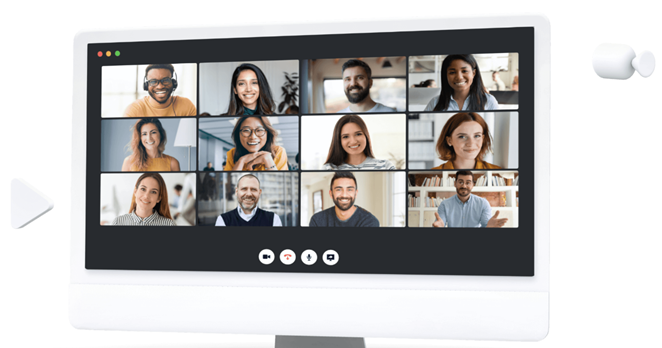
If you rely on video heavily, test your network conditions, recording needs, and calendar integrations during a trial month to ensure performance matches your use cases.
Nextiva Analytics
Analytics turn raw activity into decisions. Nextiva’s visual dashboards track call volume, answer speed, abandonment, agent performance, and customer trends by user, queue, department, or location.
Dashboards include filterable charts and custom reports, plus access to call recordings for coaching. On supported plans, sentiment indicators and AI-powered insights help teams spot conversations that may need a follow-up before issues escalate.
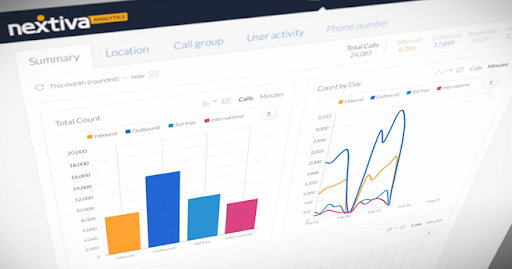
Practical tips: set weekly goals (e.g., reduce average speed of answer by 10%), tag calls that result in revenue, and review outliers (very long or short calls) to refine scripts, routing, and training plans.
Nextiva Mobile App
The mobile app brings calling, chat, and meetings to iOS and Android so teams can work from anywhere. You get HD voice, video, messaging, and basic admin controls—useful for hybrid and on-the-go roles.
Performance is generally solid, though intensive video or rapid task switching can introduce lag on older devices or congested networks. Keep the app updated, enable low-bandwidth modes when traveling, and test headsets on the devices your team actually uses.
Overall, it’s a capable companion to the desktop app and a good fit for distributed teams that still need polished call handling and collaboration on mobile.

Tip: if you have strict business hours, use status-based routing and mobile call forwarding rules to separate work and personal time.
Nextiva Automation
Automation helps agents move faster and stay consistent. Nextiva supports welcome and status messages, conversation context prompts, and auto-assigned tasks so follow-ups don’t slip.
Smart suggestions can recommend responses based on the thread, which shortens handle times and improves accuracy. Teams can also set automated emails, reminders, and workflow triggers aligned to customer actions (e.g., missed call → create task → send follow-up SMS).
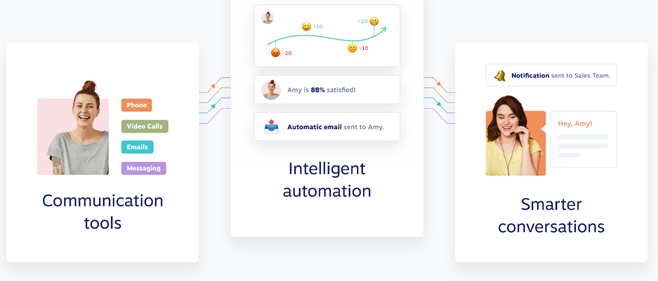
Start with one or two high-impact automations (missed-call follow-ups and post-call surveys), measure results, then expand to billing reminders, renewal nudges, and VIP routing as your team gets comfortable.
Nextiva Collaboration
Nextiva unifies voice, video, chat, and task management in the NextivaONE app’s workspaces so projects live in one place. Create channels, share files, assign tasks, and launch huddles without switching apps.
External guests can join via invitation—handy for agencies, partners, or clients who collaborate frequently. Built-in reminders and notifications reduce tool sprawl and help teams hit deadlines.
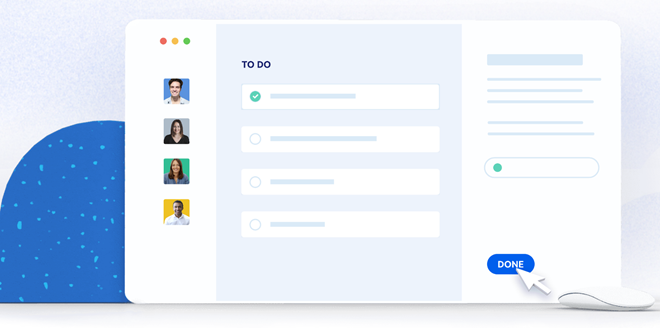
For cross-functional work—sales handing off to success, support escalating to product—keeping conversations and tasks together improves context, accountability, and customer experience.
Nextiva Implementation Playbook (30–60–90 Days)
Rolling out a new phone system goes smoother with a clear timeline. Use this practical 30–60–90 day plan to move from evaluation to measurable results without disrupting daily work. Adjust the steps to your team size and the complexity of your call flows.
Days 1–30: Foundation and Pilot
- Map call flows: list your top inbound intents (sales, billing, support, renewals, partners) and define desired outcomes for each.
- Inventory numbers and devices: identify lines to port, temporary numbers to provision, and any desk phones or adapters you’ll keep.
- Set baseline metrics: record current answer speed, abandonment rate, first-call resolution, and call volume by hour and queue.
- Configure a pilot: choose 5–15% of users across roles. Build an auto attendant, business hour schedules, and basic voicemail policies.
- Harden the network: enable QoS for voice, verify bandwidth on Wi-Fi and cellular, and test softphones with headsets your team actually uses.
- Train for the first week: cover the desktop and mobile apps, transferring, warm/cold handoffs, and how to escalate to queues.
- Collect feedback: run daily check-ins during week one, fix prompts or routing dead ends, and document quick wins to build momentum.
Days 31–60: Expand and Automate
- Scale the rollout: add remaining teams, standardize greetings, and publish a simple internal “how to” page for transfers and forwarding.
- Refine routing: implement skills-based or intent-based queues where volume is highest; shorten IVR trees to reduce time-to-agent.
- Turn on recordings and coaching: create a shared library of “great calls,” tag outliers for review, and schedule weekly 15-minute coaching sessions.
- Integrate core tools: connect your CRM or help desk so calls log automatically and screen pops show caller context.
- Automate follow-ups: missed call → task creation → SMS or email callback; post-call surveys to capture CSAT and NPS.
- Tighten security: enforce MFA, set role-based permissions, define retention windows for recordings, and add consent prompts where required.
Days 61–90: Optimize and Prove ROI
- Hit KPI targets: reduce average speed of answer and abandonment, raise first-call resolution, and track revenue-attributed calls.
- Streamline numbers: retire unused lines, add vanity or campaign-specific toll-free numbers for attribution, and clean up caller ID labels.
- Build continuity plans: set failover destinations, document on-call rotations, and test disaster recovery routing quarterly.
- Publish a playbook: document approved greetings, transfer rules, escalation paths, and a monthly analytics review cadence.
- Report outcomes: compare pre- and post-rollout metrics, highlight savings from consolidated tools, and share customer quotes from surveys.
KPIs to Track Weekly
- Average speed of answer (ASA) by queue and hour
- Abandonment rate and time-to-abandon
- First-call resolution and transfer rate
- Agent occupancy and adherence to schedules
- Sentiment flags, CSAT/NPS from post-call surveys
- Attribution: calls and revenue by campaign number
Common Pitfalls (and Quick Fixes)
- Too many IVR options: cap menus at 3–5 choices; offer “press 0 for agent.”
- Unclear business hours: set distinct schedules for holidays and lunches; record short, plain-language greetings.
- Unreviewed recordings: schedule a recurring 30-minute weekly session to coach on two calls per rep.
- No owner for analytics: assign one person to publish a simple dashboard and action items every Monday.
- Network hiccups: prioritize voice traffic with QoS and provide wired adapters for heavy callers.
Summary
The virtual phone market has plenty of overlap, but Nextiva separates itself with a thoughtful balance of calling, collaboration, automation, and analytics in a single, easy-to-admin platform. Toll-free and vanity numbers, flexible routing, and fast setup make it a strong fit for SMBs and multi-location teams alike.
If you want one provider for voice, messaging, meetings, and reporting—with dependable support and room to grow into AI-enhanced contact center capabilities—Nextiva is a top contender to evaluate alongside leaders like RingCentral and Ooma.
Pricing remains competitive for small and midsize teams, particularly with annual commitments and multi-user tiers. For most businesses, the feature depth, automation options, and support quality make Nextiva a strong overall value among virtual phone number and cloud phone system providers.