
The Internet lets you put your products in front of anyone, anywhere.
Pause and consider the upside: global reach, 24/7. Now consider the downside: everyone else has the same reach.
That’s why your content has to do real work. As a marketer, you need to create an advantage over your competitors by understanding how people actually shop online.
Many buying journeys start with a search—or on large retail marketplaces. In recent years, a sizable share of shoppers begin on Amazon or Google, with social platforms also influencing discovery. The takeaway for lesser-known brands is the same: people actively look for options, and a great product buying guide can tip the decision your way.
Done right, a buying guide educates, builds trust, and makes buying from you the obvious next step. There’s a repeatable way to get there.
This tutorial shows you how to leverage buying guides to drive sales. Whether you’re improving existing guides or starting from scratch, use the steps below to make them genuinely useful—and high converting.
Define your target audience
Before you draft a single word, decide exactly who the guide is for. Not every guide should speak to everyone—it should speak directly to the people most likely to buy that specific product.
Your guide’s audience for a category won’t always match your brand’s overall audience. It’s better to be specific and useful than broad and forgettable.
For example, if you sell a hiking backpack and also carry business luggage, write the backpack guide for day hikers and thru-hikers—not frequent flyers. Copy that tries to please both will please neither.
One reliable way to lock this in is creating a customer persona. Here’s an example:
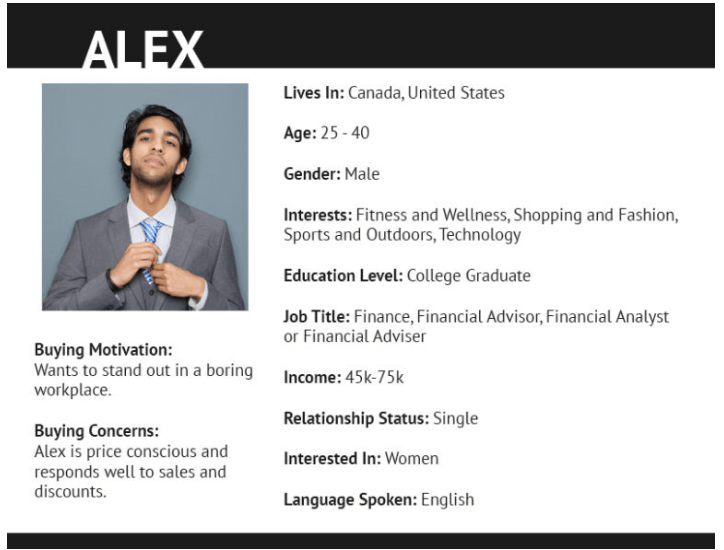
Once you have the persona, list their jobs-to-be-done (what they’re trying to accomplish), constraints (budget, size, experience), and anxieties (fit, returns, compatibility). Write the guide to address those directly.
Yes, this narrows the audience. It also raises conversion rates for the people who matter—the ones most ready to buy.
Choose a format
After you define the audience, choose the content format that will help them decide quickly and confidently.
You can publish a mostly text guide, a visual guide with images and diagrams, or a mixed format with short videos showing setup and use. Pick what best answers your audience’s questions.
Decide on the structure, too. Common, effective formats include:
- Comparisons of multiple products in the category.
- Feature checklists explaining what to look for and why it matters.
- Beginner’s guides that teach fundamentals before recommending products.
- Introductions to a new niche or product type with pros, cons, and use cases.
Here’s a desk-buying example from Wayfair:
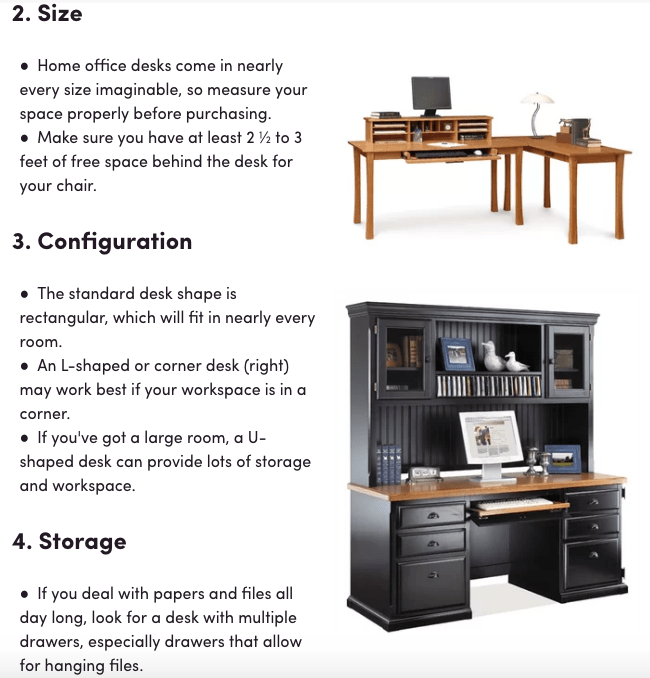
Rather than listing specific products, the guide explains the features to evaluate. The text is short, supported by images, and organized with numbers and bullets so readers can scan without slogging through walls of text.
Design for scanability and decision speed
People skim first and read second. Make the guide easy to skim so shoppers reach a decision faster.
- Use short paragraphs (1–3 sentences) and descriptive sub-headings.
- Add a “Top Picks” summary at the top (Best Overall, Best Budget, Best for <niche>).
- Include spec tables, comparison grids, and pros/cons lists.
- Call out must-know info with simple callouts (e.g., “Fits doors 28–36 in.”).
- Provide a sticky table of contents for longer guides.
Include a CTA
The goal isn’t just to inform—it’s to help the reader purchase with confidence.
Obviously, you want the customer to buy from you. If you don’t add clear calls to action, they may leave to search elsewhere.
Keep the path friction-free. Add “Shop now,” “See current price,” or “Configure & add to cart” CTAs near each recommendation, and consider sticky or inline CTAs so users never hit a dead end.
Here’s a clean example from REI.
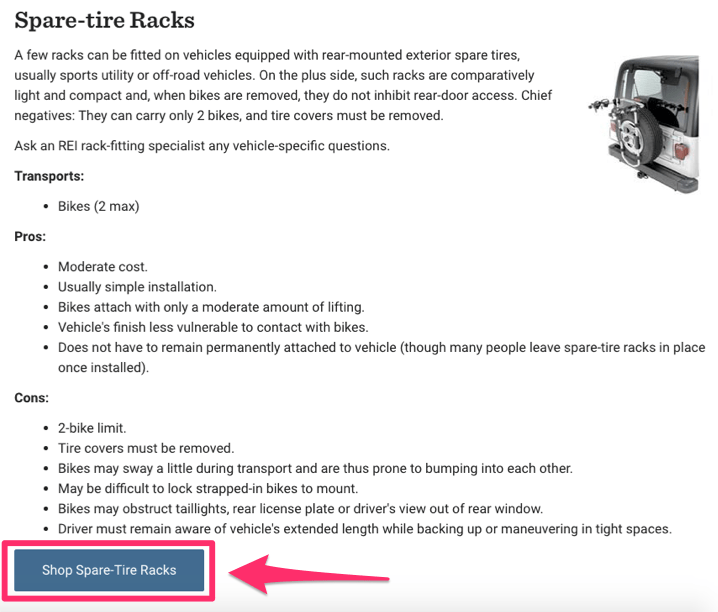
Their car-rack guide breaks the category into trunk, hitch, spare-tire, roof, and cargo boxes. Each section explains capacity, who it’s best for, and a bulleted list of pros and cons—balanced and helpful.
Listing cons doesn’t slam your products; it sets expectations and builds trust. A spare-tire rack’s “two-bike limit,” for example, is a neutral constraint that helps shoppers pick the right model.
Every section ends with a low-friction CTA to buy. The tone stays helpful, not pushy, which is exactly what readers want.
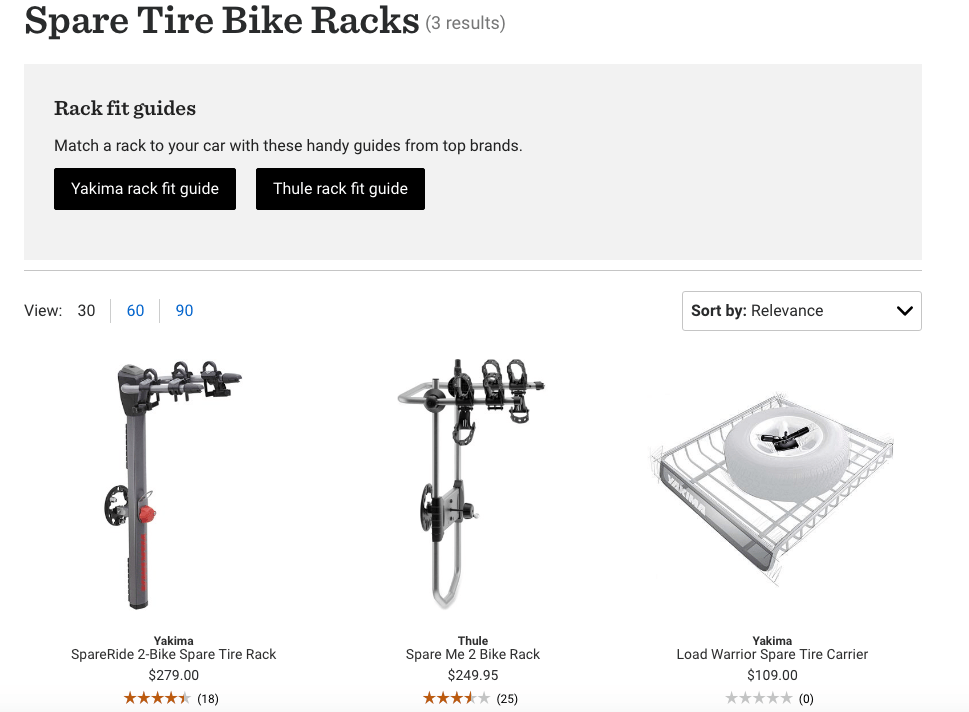
From the guide, the CTA takes shoppers directly to relevant product options—no hunting around your site required.
Compare products in different price ranges
Not everyone wants the top-shelf model. Many shoppers want the best value for their budget, and they expect to compare quickly.
Make it easy by segmenting your recommendations into price bands and naming them clearly (Budget, Mid-range, Premium). For a couch category, your bands might look like this:
- Couches under $250
- Couches $250–$750
- Couches over $1,000
Include price ranges in the guide and you’ll anchor value perceptions. Anchoring is a classic tactic to generate more profit by focusing on your pricing strategy. When a premium option sits beside a mid-range pick, the mid-range often becomes the obvious choice.
Call out “Best Budget” or “Best Value” to help shoppers self-select quickly.
Apply SEO principles
Buying guides can rank well for long-tail search terms—the specific queries people use when they’re close to purchasing.
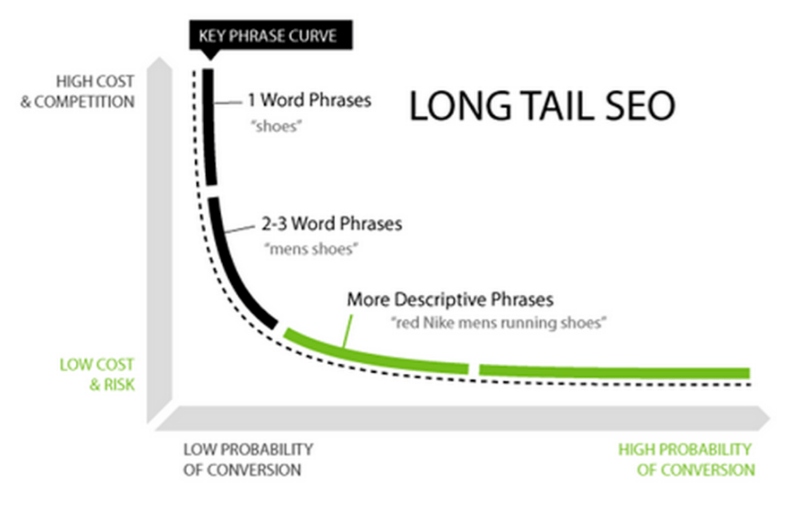
Start by researching how people search within the category. Look for intent-rich keywords that include use cases, constraints, and qualifiers (for, under, vs, size, waterproof, wireless, quiet, etc.).
Avoid casting too wide a net. Broad terms bring unqualified traffic and low click-through rates. Specific terms reach motivated buyers.
If you sell socks, “how to choose socks” is too broad. Aim for focused terms like:
- Best ankle socks for workouts
- Women’s waterproof running socks
- Best high socks for hiking
- Dress socks for sweaty feet
Map keywords to sections, use them naturally in headings and summaries, and answer the related questions people ask. Add an FAQ block if you cover common pre-purchase questions.
Finally, make it easy for searchers and shoppers to move through your site: link to related categories, comparison pages, and setup guides. Use descriptive anchor text so readers know what they’ll get next. As search results increasingly include AI-generated summaries, surface concise, scannable answers (bullets, FAQs, pros/cons, spec tables) and use structured data (Product, Review, FAQ) so your key details are understood and eligible for enhanced presentation.
Include reviews
When people land on a buying guide, they’re researching—and reviews are usually the top thing they want to see.
Include a snapshot of real customer feedback (star averages, number of reviews, short quotes) and summarize trends (“Most reviewers found the fit true to size”). You can also add a customer review or testimonial to increase brand credibility and link to the full review set for each product. Labels like “Customer Favorite” or “Popular Choice” help scanners orient fast.
Back up claims with data where possible—return rates, warranty terms, or third-party test results. Specifics create trust.
Plan your guide around real buyer questions
Source questions from your support inbox, live chat transcripts, on-site search logs, and product Q&A. Build sections that answer those questions in plain language, then point to the exact products that fit.
- Will this fit my space? Provide dimensions and a quick fit checklist.
- Is it compatible? List required accessories or versions.
- How hard is setup? Include a 4–6 step overview with time estimates.
- What if I don’t like it? State your return and warranty policy clearly.
Measure and improve continuously
Publish the guide, then iterate. Track metrics like organic clicks, click-through rate from search, time on page, scroll depth, product click-outs, add-to-carts, and assisted revenue. Use Search Console for query and CTR trends, and GA4 events to trace on-page interactions through to purchase.
- Run A/B tests on CTA copy (“See price” vs. “Shop now”), placement, and button size.
- Use heatmaps to see where readers stop and add sub-headings or summaries there.
- Refresh the guide when inventory changes, new models launch, or prices shift.
- Add “Last updated” at the top and keep it true by revisiting quarterly.
Conclusion
Product buying guides let you help shoppers at the research stage and convert them when they’re ready.
Start by defining a tight audience and pick a format that’s fast to scan. Use intent-rich, long-tail keywords, break down options by price bands, and place clear CTAs wherever a decision happens.
Feature reviews, answer real questions, and keep the guide updated as products evolve. Do that consistently, and your buying guides will attract qualified traffic and turn it into revenue.