
Over the course of writing and researching for this piece, we didn’t mean to kill search engine optimization (SEO) for blogs—but we certainly didn’t hope to resurrect it to godlike status either.
That said, optimizing blog posts for SEO is something that many brands and individual publications still shy away from, misuse, or straight up ignore.
In the following article, we’ll shed some light on the most promising SEO tips for blogs that you can start implementing right away.
So fasten your seatbelts and tell your neighbors au revoir—we’re taking off to “SEO-land” and we’re bringing you with us.
What Is SEO and Should We Care?
First of all, why does it seem like every digital marketing guru in the world touts SEO as being more important than the invention of pickled gherkins? And why should we care whether our blog posts end up on page one of the search engine results page (SERP) rankings, instead of, say, page nine?
To answer the first question, SEO is important for many reasons, none of which involve gherkins…yet.
SEO matters because it helps people find your website so they can do things like interact with it, answer a query, or compare two or more products they’re considering buying—it all depends on the content makeup and nature of your blog.
In other words, SEO improves your blog’s discoverability, which leads to more traffic, captures more leads, and eventually converts those leads into paying customers. In theory.
Out there in the real world, it’s a bit more complicated than that.
In any case, search engine optimization is the foundation upon which your blog rests—if you want to stay relevant and competitive in the long run, you’re going to need a blog strategy with a strong foundation in SEO.
Now, as for the second question, why should we care about rankings at all?
In short, because we have to.
The average and absolute placement of your pages in the SERPs directly correlates with the amount of traffic you are expected to bring in. In other words, the higher your pages rank, the more people will end up clicking on your pages and landing on your blog.
31 SEO Tips to Get on Page 1
Remember those gherkins?
Pickling them properly requires a delicate balance between the potential of hydrogen (pH) levels, salt, and a couple of other things meant to extend the shelf-life of certain foods.
Think of SEO as the pickling of digital marketing, where each blog post is prepared to stay relevant and be future-proof for the longest amount of time.
Now think of this list as a big ol’ jar of actionable SEO tips to make sure your content won’t spoil too soon.
1. Conduct Detailed and Relevant Keyword Research
If you struggle to come up with relevant subjects for your blog, you’re not alone. It’s not easy to stare at a blank page and come up with a proper sentence morphology that sounds good, reads well, and satisfies multiple commercial and SEO criteria all at once.
Moreover, you then have to string together all of these fully-loaded sentences into a coherent paragraph, and then you have to string all of those paragraphs together into a fully coherent post.
Then, your final post somehow needs to rank highly in search results by virtue of your blood, sweat, and monomaniacal effort—similar to how Ahab felt about his ill-fated pursuit of the white whale. (Spoiler alert, it doesn’t go well for the Pequod’s captain.)
This is where proper keyword research comes into play.
Instead of taking a shot in the dark, you can use a multitude of keyword research tools to reverse-engineer what your intended audience or target demographic is searching for the most.
Some of the most popular tools for keyword research include the following:
There are 1,001 angles for approaching keyword research, and most of them will work just fine on their own. The key is to pick a combination of multiple tools, test them out, and come up with a system that works well for you, especially in the context of your blog.
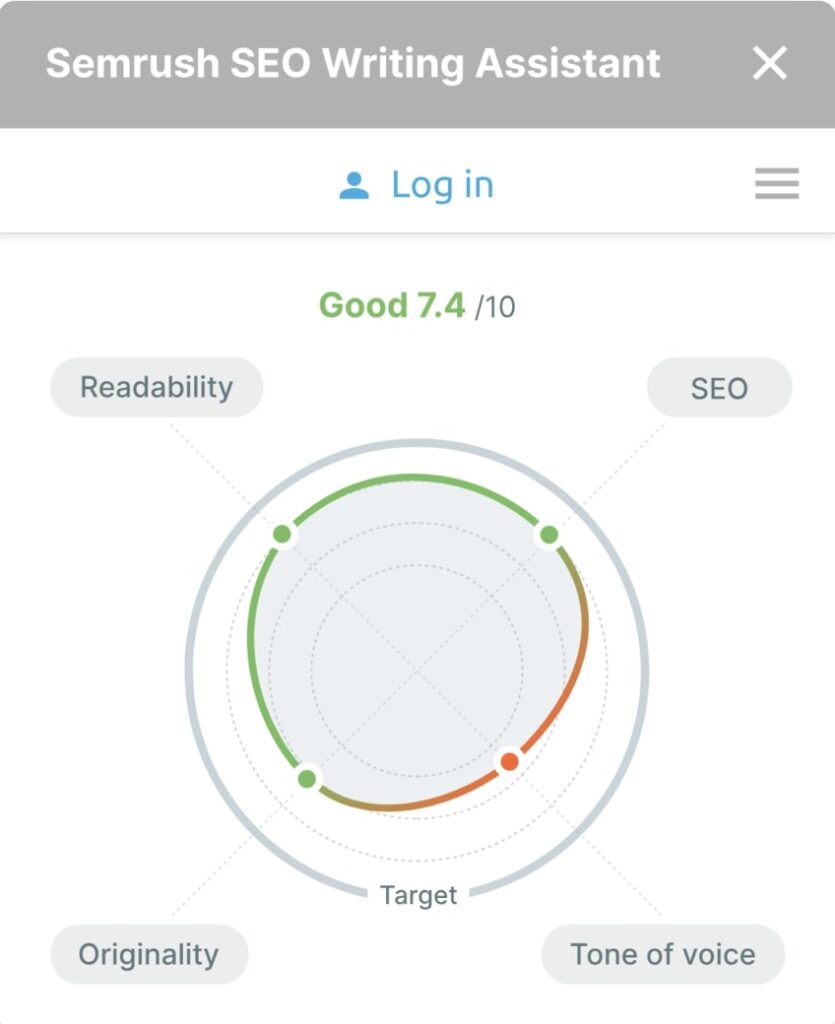
Another route you can take, assuming you don’t always have the time to conduct manual keyword research, is to use a shortcut such as Semrush’s SEO Assistant Tool, which does most of the heavy lifting in your stead.
It seamlessly integrates with WordPress and Google Docs, and it’s generally considered the industry standard for automated keyword research by writers, content marketers, and production specialists across many blogs, ecommerce sites, and various online editorials.
For additional instructions, you can refer to our detailed guide on how to conduct relevant keyword research for SEO.
2. Come Up With a Killer Title
As the search engine industry and search in general are evolving, adapting to the hurdles for coming up with a great title can make or break your content’s performance.
In the past, writers could slap together a patchwork of relevant buzzwords, add some numbers, and call it a day. Today, however, your title has to be creative and emotionally engaging—but it can’t be too clickbaity or emotionally barren either.
It’s common practice to have most of your main keywords in the title, but they have to be carefully placed to avoid sounding like they’re coming from the clunky kinds of large language model generators (LLM).
Speaking of AI, there are tools such as AIOSEO’s title generator that allow you to generate multiple title suggestions at the drop of a hat—though if you go down that road, we would advise you to use AI sparingly and always have a real human guiding the entire process from beginning to end.
By the time you’ve reached that end, having an effective blog title could draw more eyeballs to your post, resulting in more clicks and therefore an improved click-through rate (CTR) as well.
3. Add Multimedia to Your Blog Posts
Things like images, videos, and even GIFs can spruce up your blogs and make them more interesting for potential readers.
If your readers genuinely enjoy reading your articles, they tend to spend more time on your website as a result. This can help immensely with the so-called bounce rate.
A bounce rate is the percentage of readers who navigate away from your site after landing on your page. The importance of this metric has been yo-yoing throughout the years, but the metric is still a valid approximation of how valuable your visitors think staying on your blog is as opposed to navigating elsewhere to accomplish their goals.
That’s why it’s important for your content to be engaging.
For example, one idea is to insert infographics or royalty-free images as a way of breaking up long paragraphs of continuous text to make your blog posts more appealing for the readers.
Videos are also a viable part of the multimedia packet, and you can leverage them to introduce a different source of traffic that works independently from your website. Specifically, since hosting services and other content management systems (CMSs) are not always well-equipped to handle videos, you can upload them to another video hosting provider like YouTube and embed those on your page wherever applicable.
That said, creating these videos can be another task altogether, but you can always rely on outside help (through Fiverr or Upwork, for example) to produce them for you.
4. Consider Regular Internal Linking
Internal linking is the practice of linking relevant articles that guide your readers to a different page on your blog.
As a cheeky meta example, we can point you to our own guide that talks about how to get more search engine traffic with internal linking in more ways than one.
A good internal linking strategy requires having multiple contextual posts that you’ve already published—that way you can spread the so-called link juice all across your blog so that your posts work together.
If done properly, internal linking can create a full journey of pages that your readers and even search engines can follow.
5. Create Content Hubs
A content hub, also known as a topic cluster, is a collection of curated content on a related or similar topic. It can contain blog posts, videos, and whichever other media that falls under the same overarching subject.
Think of a content hub as a concentric circle that starts from one central topic and then spreads outwards to cover any related subtopics.
Content hubs are important for SEO for a few reasons:
- They allow for a thorough exploration of a given main topic
- They provide a better structure for your blog
- Content hubs offer the opportunity to snatch keywords that are harder to rank for
If you decide to create one or more content hubs on your blog, you first need to identify a main topic, then the subtopics, and then come up with a suitable structure that will neatly fuse them together.
To jumpstart the elusive muses of inspiration, you can:
- Analyze your target audience—what are people searching for and where are they experiencing a lack of informational content?
- Research your competitors—what is the competition doing that you aren’t?
- Consult your internal teams—which department could benefit the most due to the addition of a given topic on your blog?
By now, you should have a general understanding of how to proceed with building your desired content hub and structuring it with subtopics accordingly.
Next, a good idea is to perform additional research by sifting through promising topics and choosing one that looks like it could provide the most benefit with the least effort. One way to go about this is by using Semrush’s Topic Research tool.
It’s important to avoid most topics that are too complex to develop or demand huge chunks of resources. Instead, focus on a topic that you already have a good understanding of, and try to build your concentric hub circle outwards from there.
Even if you change your mind halfway through building the chosen hub, don’t worry! You can always put the current main topic on pause and change priorities midway through.
6. Incorporate Latent Semantic Indexing (LSI)
After you’ve identified most of your keyword opportunities, a good next step is to identify your main keyword.
Generally speaking, the main keyword should be the one that has a reasonably high search volume and a relatively low number of competitors targeting that keyword given your blog’s niche.
As a practical example, let’s assume that “search engine optimization” is your main keyword phrase.
Now, right off the bat, we know from experience that both “SEO” and “search engine optimization” are some of the most targeted keywords across multiple niches. If you run a smaller blog, chances are it will be really hard to rank for highly competitive keywords like these two juicers.
Nevertheless, we can still try to circumvent this hurdle by extending the main keyword phrase into a long-tail keyword instead. For example, after some trial and error, you might find that a long-tail keyword like “how to rank your blog high in search” has potential.
The next step is to identify even more LSI keywords that are similar in meaning to our main keyword phrase. One simple way to do this is to enter your main keyword phrase in a Google search and scroll down to the very bottom of the results page where similar search suggestions will pop up.
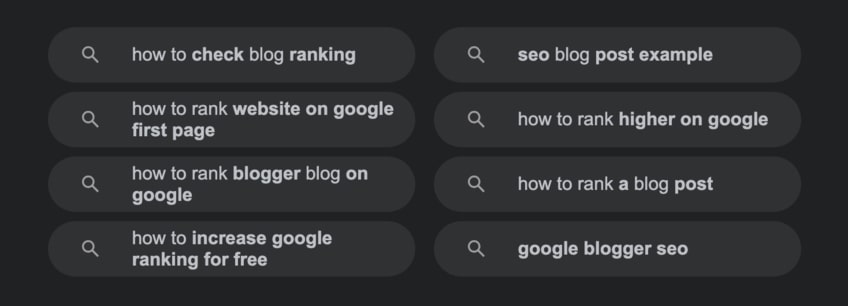
You can incorporate a bunch of LSI keywords in your content, as long as you’re working them in naturally and not going overboard with them. Search engines have become sophisticated in recognizing keyword stuffing, so tread carefully.
Finally, one last thing to note here is that main keywords and phrases are sometimes called focus keywords and focus keyphrases, which kind of sound like LSI keywords. See what we did there?
7. Meta Descriptions Are Your Friends
Meta descriptions are HTML elements that provide a short description of a web page.
Currently, the effectiveness of meta descriptions in blog posts has been a subject of intense debate among SEO experts. Our opinion is that as long as the HTML tag for meta descriptions exists in the latest HTML standard, it’s likely to have some impact on the outcome of your rankings.
Most popular search engines, as well as social media sites such as Facebook, Instagram, and Pinterest, tend to display meta descriptions—albeit with some small variety between them.
Thankfully, there are various plugins such as AIOSEO and Yoast that allow a complete and detailed edit of meta descriptions in your blog posts.
The key to writing a good meta description is making it short, relevant, and to the point. The current recommended character limit for meta descriptions is 155 characters, although that may change in the future.
If you break the limit, your meta description will be truncated after that. Lately, Google has been truncating meta descriptions that follow the character limit, so it’s fair to say that the entire ordeal is a moving target.
Another good rule of thumb is to add your main keywords at the beginning of your meta descriptions, but again, try to do so without resorting to keyword stuffing and sentences that sound robotic.

8. Try To Snatch the Elusive Featured Snippet
Back in the day, most of the search results on Google looked more or less the same, at least visually.
Nowadays, the Google SERP can be described as a collection of:
- Text results
- Rich results
- Featured snippets
- Image results
- Video results
- Exploration features
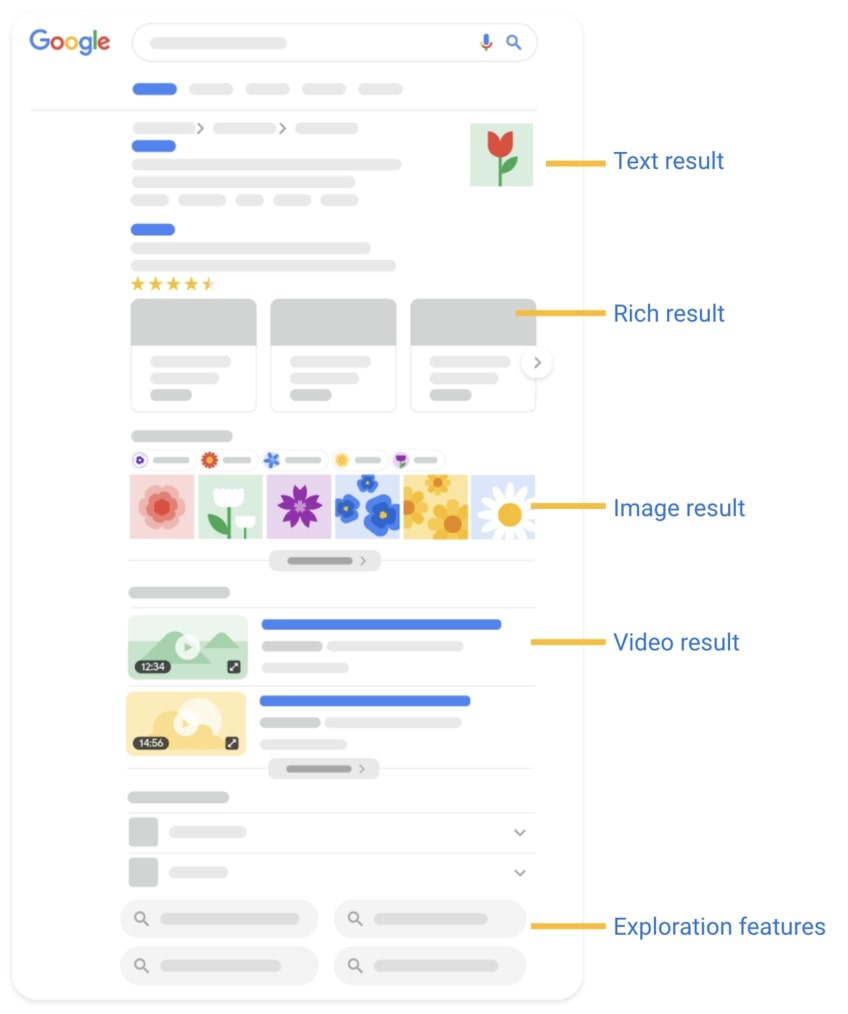
The featured snippet is a box of information that essentially ranks number zero (in a good way) on the first page in the Google SERPs. Think of it as an ace in the hole that one lucky website gets to have for however long it lasts until something else takes its place.
In general, the snippet takes up more space than a regular organic search result, which means that the snippet essentially displaces organic results even further down the page.
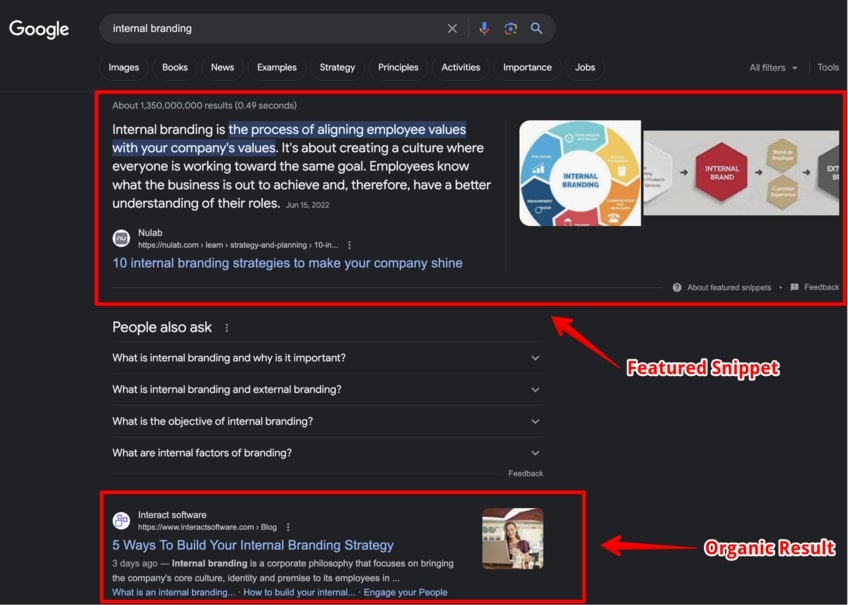
Additionally, the featured snippet is often followed by the “People also ask” card, pushing organic results down to third place.
For mobile users, there’s a high probability they won’t even scroll down far enough to see many of the results below the snippet, so clearly the snippet is a very powerful prize for bloggers who manage to win it. Currently, there is no official documentation from Google on how to win the featured snippet, although you can choose to opt out of it altogether.
However, we would advise against doing that unless you know exactly what you’re doing and why—since being in the snippet means you won’t show up in the regular search results, where you could have ranked very highly…or practically not at all.
9. Utilize Categories and Tags
Most popular content management systems will feature the option to sort your blog posts with categories, as well as to add tags for better organizational structure.
Categories are similar to content hubs, insofar as they both feature a main topic and subtopics that follow after the main topic.
The difference is how you think about organizing them. In a sense, categories are like the main part of a clickable drop-down menu list. They can’t branch out in multiple directions compared to the subtopics in a given content hub, which makes categories a bit more strict.
On the other hand, tags are reserved to use on individual blog posts. These can be a valuable asset to include in your overall SEO strategy because they help both web crawlers and human readers better understand your content structure.
10. Look for Guest Posting Opportunities
Guest posting is the process of writing content for a different website, blog, or online brand for one of the following purposes:
- To get a backlink in return
- To promote your products, including a book, service, or course
- To raise awareness for a charity fundraiser
In broad strokes, guest posting can serve as an excellent networking opportunity for both seasoned and upcoming bloggers.
To identify good guest posting opportunities, you can use either simple search queries or advanced search operators. For example, queries like “write for us” or “guest post” followed by your preferred blog niche should work decently enough to identify at least 10 good guest blogging opportunities for direct outreach.
Advanced search operators should narrow down your search results even further. We advise testing some of these out before investing huge chunks of time sifting through SERPs.
Here are some examples of advanced search operators to identify guest posting opportunities:
- seo intitle:”contribute to”
- search engine optimization intitle:”write for us”
- seo inurl:write-for-us
- seo inurl:author/neil-patel
- guest post intitle:resources inurl:”resourses”
Try to mix up some of these search operators to get different results, since you don’t want to pitch the same people and blogs as everyone else is doing. Andrew Huberman can’t be on everyone’s blog, right?
Anyway, one of the downsides of guest posting is that not all websites are beneficial for promoting your blog. With the internet being what it is, there are many sites out there that could be detrimental to your brand if your post ends up on them.
Sites to avoid guest posting on include:
- Content farms
- Sites with misaligned ethics relative to your blog
- Spam sites
- Adult and casino websites (there are some exceptions, but the general rule is to avoid these types of sites)
- Phishing, malware, and adware sites
If you are unsure whether a website would be a good fit for guest posting, you can use tools like Ahrefs or Semrush to check metrics like domain rating, outbound links, traffic in the last year, and domain age to assist with your decision.
11. Write Posts That Are Satisfying To Read, Obviously
User experience (UX) is also an important part of article production. Posts that are hard to read, difficult to comprehend, and generally structured like a Jenga tower after round seven will rank lower than clearly articulated and neatly structured articles.
This is easier said than done.
Thankfully, there are several moves you can make to improve the UX of your upcoming and existing posts, such as the following:
- Use shorter sentences
- Break up long paragraphs
- Insert images and videos where applicable
- Use bulleted lists
- Use proper headings
For example, at Quick Sprout, we typically don’t use any headings beyond H3, since that introduces additional complexity that we don’t want to bother our readers with.
Overall, the UX of a post is roughly correlated with the amount of time your audience spends on your blog. Improving it can decrease your bounce rate and push your site higher up the search ranking ladder.
12. Explain the Topic in Great Detail
If you’ve already incorporated LSI into your production process, then you’ve already identified multiple angles for approaching an upcoming blog topic, regardless of its relative complexity.
This methodology can also guide you towards producing an article that is informative, comprehensive, and covers the main topic in great detail. A detailed post is far more useful to readers than a cursory one filled with so-called thin content.
Apart from utilizing LSI keywords, you can also enter your preferred keyword or phrase in Google and then switch to the Images tab. This can be a good way of expanding the scope of your search to introduce new ideas and variations for your main topic.

13. Spruce Up Older Blog Posts
Most promising authors forget the number one rule of managing blog content, and it has something to do with babies and socks.
Babies and socks?
Yes, managing a blog is akin to raising a baby, which needs new socks whenever it gets too big for the old ones.
Same with blog posts. You don’t just publish a post once and let it float there for the rest of eternity. As the baby outgrows the socks, so too will your content outgrow its usefulness as soon as new information disrupts the current understanding of your topic.
In terms of actionable tips, here are a few suggestions that you can use to keep your posts fresh:
- Share it on social media, or re-share it again after a certain time, such as six months to a year after publication
- Go back and upgrade your internal links
- Add new sections that bring your content up-to-date with current news
- Remove information that becomes irrelevant or is no longer applicable in the context of your article
- Use a rank tracker to track how your blog post performs in the SERPs
Once in a while, we suggest going back to your old blog posts and exploring new ways to make them more relevant to match the spirit of the times.
14. Write a Compelling Hook
Breaking into the vault of journalism and creative writing, a hook is a compelling first sentence and/or paragraph that grabs the reader by the suspenders and holds their attention until they’re fully invested in the piece.
Without an enticing hook, your audience won’t be motivated to continue reading the content. At that point, they might not just leave your site, but they might also be deterred from coming back the next time they see your domain name.
To avoid that, here are several tips on how to produce an effective hook:
- Take the time to write an effective and powerful title that satisfies you
- Drop your readers straight into the crux of things, à la that “You’re probably wondering how I got here” technique
- Make an unexpected first statement (“Blogs are finally dead, but not in the way how most people think”)
- Ask an idiosyncratic question (“Are pickled gherkins the future of SEO?”)
- Steal from the classics (“We didn’t mean to kill SEO”)
15. Write an Enticing Call to Action (CTA)
A blog post without a proper CTA is like a lone donkey stuck on a gravel crossroads. It won’t get anywhere without outside help.
The main point of a CTA is to lead your audience to take the desired next step in the conversion funnel outlined in your blog post. The CTA has to be contextually relevant and fit naturally with the rest of your content.
CTAs can be all sorts of things, including:
- Commercial buttons
- Widgets
- Hyperlinks
- Images
- Social share buttons
The key to excellent CTAs is to use them sparingly throughout your blog post, place them strategically and logically, and make them consistent with each other. Remember, appropriate CTAs go hand in hand with a good UX!
16. Optimize Your URLs
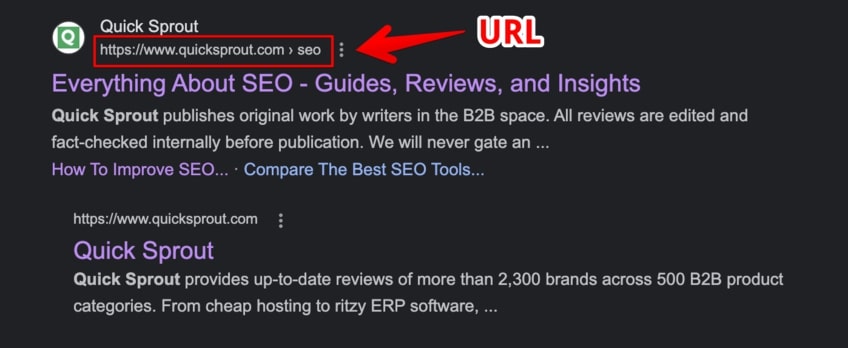
Your URL is one of the first points of contact with web crawlers and search engine bots when they perform indexing duties. It’s also one of the first data points captured when crawling your blog posts.
The main structure of your URL will tell crawlers about:
- The security level of your site, whether it uses HTTP or HTTPS protocols
- How it redirects, as both the “www” and the lack thereof should go to the same place
- What your blog is really about regardless of your domain, be it branded or an exact match of keywords (barky.com vs healthydogfood.com)
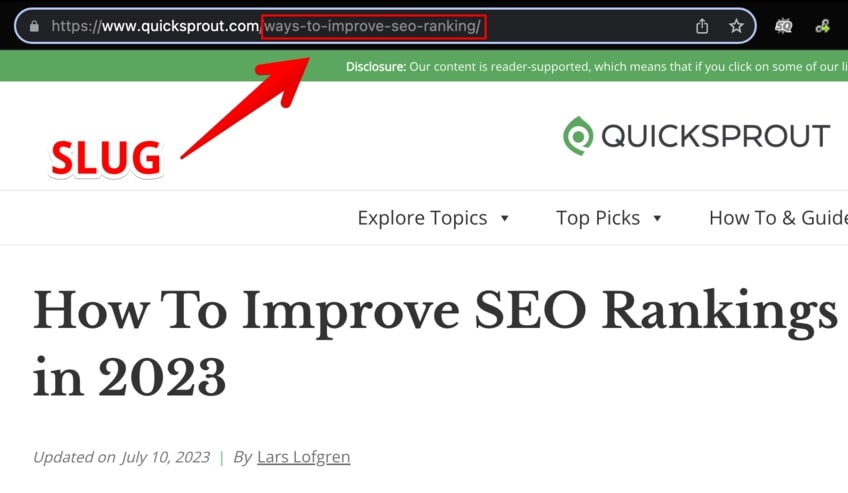
Another key part of the URL is the slug. A URL slug is the unique identifier of a given page that sits at the very end of the URL structure. This can be a great place to include your main keywords of the topic you’re writing about.
Currently, the effectiveness of putting keywords in URLs is a point of contention, and SEO experts are divided about their contributions to search engine discoverability and page rankings.
Can’t hurt to have informative URLs, though, right?
17. Optimize Your Media
Not all media types are created equal.
For example, some GIFs, high-fidelity images, or videos uploaded on unoptimized media clients could significantly slow down the loading time of your page. Slow loading time means the user is more likely to click away before the page fully renders, thereby abandoning your brand for good.
To avoid this issue, it’s important to use best practices concerning media optimization across the entirety of your blog.
A good checklist for media optimization would look something like this:
- Watch out for media file size—unoptimized GIFs, high-quality images, and unchecked videos can significantly worsen the UX by slowing down the page loading time and introducing scrolling lag
- Make your media consistent throughout your site by choosing a resolution, quality, and placement that works well with your blog theme
- Make your media complementary to your content and remove things that cause unnecessary weight and don’t fit the overall narrative of your posts
Keep in mind that many content management systems have their own built-in smart image compressors, but you can also do so manually with a tool like TinyPNG.
18. Add Image Alt Text
As certified sticklers for media optimization, let’s dive into the backend—where images are represented on most websites via the magic of HTMLs “img” tag.
Mainly, this “img” tag contains two main attributes:
- src (denoting the source of the image)
- alt (representing the alt text of the image)
Additionally, the “img” tag can also contain other attributes, including:
- class (used for styling the image element)
- title (adds a text tooltip that shows up when users hover over it with the mouse)
In HTML, an example with the first two attributes would look something like this:
<img src=”/image-example.png” alt=”Example alt text for your image”>.
As you may have predicted, some SEO experts and digital marketers don’t really consider the alt text to be a viable ranking factor in the SERPs, but we’d still advise writing contextual alt tags for images whenever you upload one to your upcoming blog posts—because they can at least improve the user experience.
For example, if the image doesn’t render, users can read the alt text descriptions and connect the dots between the context of your content and your featured media relatively quickly.
Similarly, if your image is used as a link to another section, page, or website, the alt text assumes the function of anchor text if the image isn’t properly rendered.
Furthermore, any visually impaired visitors who use a screen reader would get the added benefit of hearing the alt text on your images read aloud. That alone might help you remember the rule of thumb for making your image alt text as descriptive as possible, within a reasonable character limit.

For the above goodest of boys, instead of using “dog in nature” as the alt text, you can break out from your creative shackles in a more descriptive way with something like, “brown and white border collie playfully gazes around surrounded by nature.”
19. Write From the Heart
“In the quest to game the SERPs, we found immeasurable treasure but we lost our hearts.”
That’s a pseudo deep quote we totally just made up.
The point is, you don’t always have to push yourself into writing something you’re not actually passionate about. Readers will often pick up on your energy and start to feel the same way, wondering why they clicked on that gosh-darned search result in the first place.
This is bad for bounce rate, it’s bad for SEO, and it’s not a good start if you want to build a reputable blog.
To write more from the proverbial heart, it usually means:
- Exploring topics that are near and dear to you
- Writing about things that kick-start a strong emotional response from you
- Relay known information from a never-before-seen angle
- Keeping it light and engaging without going overboard—like a certain excerpt from Herman Melville’s prose that we’ll talk more about later
20. Watch Out for E-E-A-T
While we are highly tempted to make a gherkins e-e-a-ting joke in this chapter, sadly we have to refrain from pursuing that unholy thought.
E-E-A-T is Google’s acronym for its loose concept of ranking sites and pages according to their experience, expertise, authoritativeness, and trustworthiness.
At Google, there is a department of people known as Quality Raters. Their input helps determine the search algorithm’s quality and how current or future updates will further improve search results. During their tenure, they refer to a document called Search Quality Rater Guidelines. This handbook is updated roughly every year to reflect the changes in search engine behavior.
Anyway, the four horsemen of E-E-A-T, though scary for some, are nothing to be afraid of.
Experience
Valuable blog posts demonstrate the original author’s experience in the given field.
For example, it’s a good idea for a headphone reviewing website to showcase an author’s experience with a previous model when comparing pros and cons of a new one. This is proof they know what they’re talking about and is a good ranking signal that is very hard to fake.

Expertise
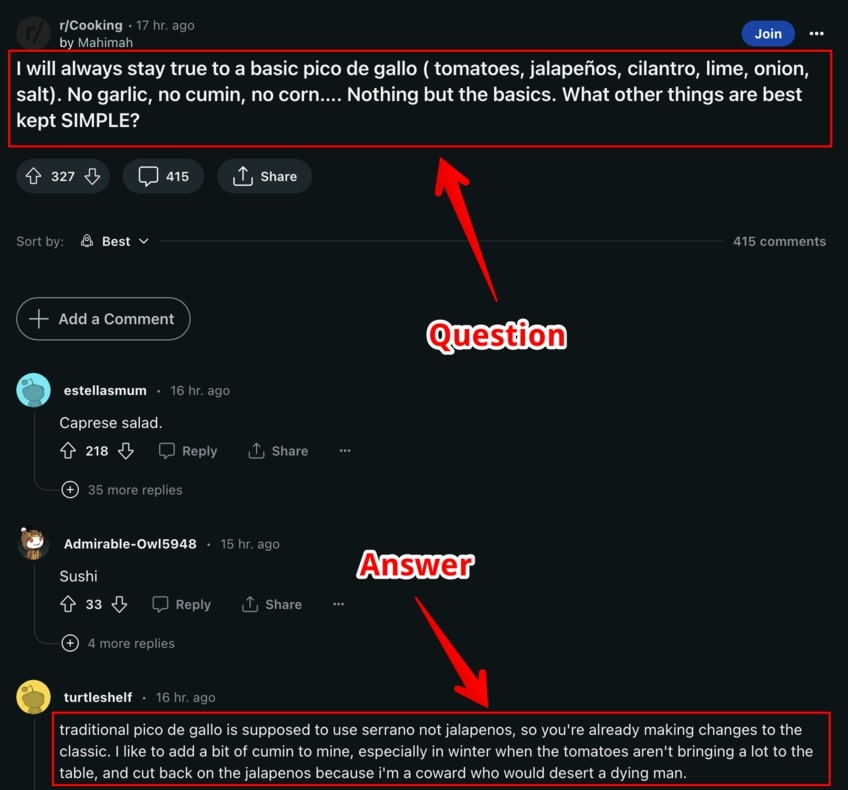
This mostly refers to author credentials and knowledge on a given topic, assuming they have a qualified opinion.
In the field of cooking and handling food, for example, both search engine bots and Quality Rater humans will look for credentials that will prove the author’s expertise in the industry.
Most people will want recipes and advice from certified professionals and/or mainstream thought leaders like Jamie Oliver. On the flip side, some readers would like real-world examples coming from the earned experience of their peers.
Authoritativeness
Authoritativeness combines multiple parameters that Quality Raters are instructed to look at, such as:
- The overall legitimacy of a website
- The quality of a website’s authors and their credentials
- The content reviewers, if applicable, that add an additional level of confidence
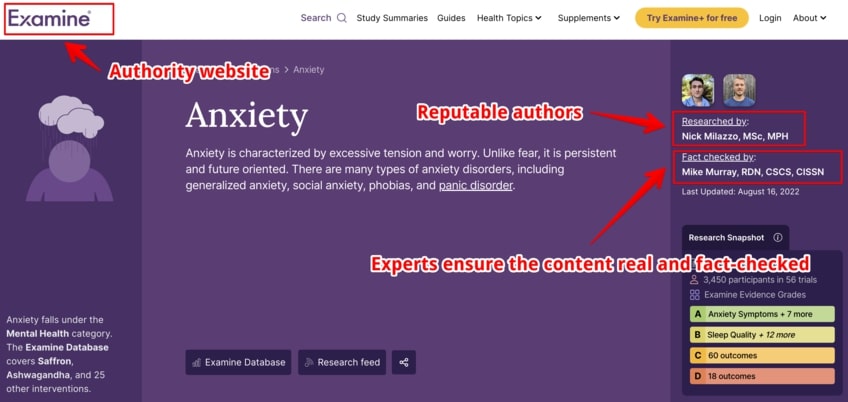
Ultimately, achieving this status means that other sources in the field will point to you as a viable authority source as well. It’s a vote of confidence and a worthy goal every blog should strive to achieve.
Trustworthiness
Finally, the T for Trustworthiness is perhaps the most integral part of the entire concept.
An example of a trustworthy blog would be one that fully discloses its business model upfront, such as by telling its users that the product featured in the latest post was given to the blog in return for a review.

On the flipside, an example of an untrustworthy site would be an online store with an unsecured connection at checkout.
21. Consider Responsive Design
The future of search is continuing to move from desktop to mobile at an accelerated pace, and Google is already serving mobile-friendly search results first. This means that blogs without an optimized mobile experience will continue to fall behind in the SERPs.
Fortunately, responsive design is an ingenious solution with which a website’s dimensions can automatically adjust according to the device it’s being accessed from. This approach removes the need to have device-specific pages with various URLs to serve each one.
By utilizing responsive design, you won’t just be simplifying the URLs for each of your posts—you’ll also be saving your entire blog from having to split up the aforementioned link juice across multiple URLs whenever you want to use an internal backlink.
Either way, the key point for now is that responsive design helps with SEO, nudging the Google crawlers to recognize your blog posts faster than it otherwise would for a static website design.
22. Optimize for Voice Search
“Alexa, what are Moby Dick’s weaknesses?”
That’s what Captain Ahab might’ve said if he were somehow to materialize on a 21st century whaling trawler with internet access. Given that whaling is banned these days, however, time travel would be the least of Ahab’s worries.
According to many SEO experts, voice search is the true future of search engine optimization.
Optimizing your blog for voice search means employing a collection of different techniques to increase the probability of your site appearing in the results of a given voice search query.
Here are some general, actionable tips on how to optimize for voice search:
- Target long-tail keywords—consider examining a longer question under your H2 headers and then providing an elaborate response in the following paragraph
- Use colloquial language—voice search is usually conversational, so matching the query with the same style of syntax will increase your chances appearing in a result
- Focus on local SEO—create a detailed Google Business profile and try to answer search queries like “best pickled gherkins near me” in your blog posts
“Alexa, what’s the next SEO tip?”
23. Create an SEO Persona for Your Blog
Currently, buyer personas are a common thing in digital marketing. Almost every business in existence has at some point considered researching its ideal target audience, because why wouldn’t you?
Similar to a buyer persona, an SEO persona represents a type of user that searches for specific keywords online and ends up landing on your blog.
To identify the ideal SEO persona, you can ask such questions as:
- What is the common search pattern in the user’s online behavior?
- How does your user conduct searches on social media?
- Is your user active on forums, Reddit, Quora, message boards, or other online groups?
One way to get this information is to create an online survey form and ask your audience members to complete it at their leisure.
However, keep in mind that gathering information has lately become a real challenge due to various privacy concerns, misuse of personal data, and selling personal information to third parties. Being honest about how you’re going to use this data will take your blog a long way into becoming a competitive powerhouse in your chosen niche.
24. Use Proper Schema Markup
Schema markup refers to structured data—a type of code that you insert into your site’s backend that helps search engine crawlers better classify the contents of a given page.
Schema markup includes detailed information about multiple different parameters such as the following:
- Reviews
- Product prices
- Business addresses
- Business hours
- Contact information
Funnily enough, schema markup is not visible to users—it’s only there to assist search engines in parsing the contents on your site.
Finally, schema markup can also help with voice search, thus increasing your chances of ranking for voice queries as well. You can use this Google tool to test the prevalence of structured data (or lack thereof) on your site.
25. Stay on Top of Your CMS SEO Tools
Whether you’re using WordPress, Drupal, or a custom CMS, each platform offers a variety of SEO tools at your disposal.
The value of knowing your CMS SEO tools inside and out extends both to brand new bloggers and to webmasters who want to update their existing pages.
Generally speaking, here’s a few things you can do to understand more about these tools:
- Check if the CMS has created a valid sitemap for your blog, usually by typing “sitemap.xml” after the top-level domain in your URL
- For WordPress specifically, check out the options offered by Gutenberg, the native content editor
- Learn how your CMS displays the title and heading tags, since sometimes the title in your content editor becomes H1 on the user side
- Consider manually adding some additional CSS to style your blog, but not at the expense of performance and speed
- Check if your CMS is compatible with the most popular third-party SEO plugins out there
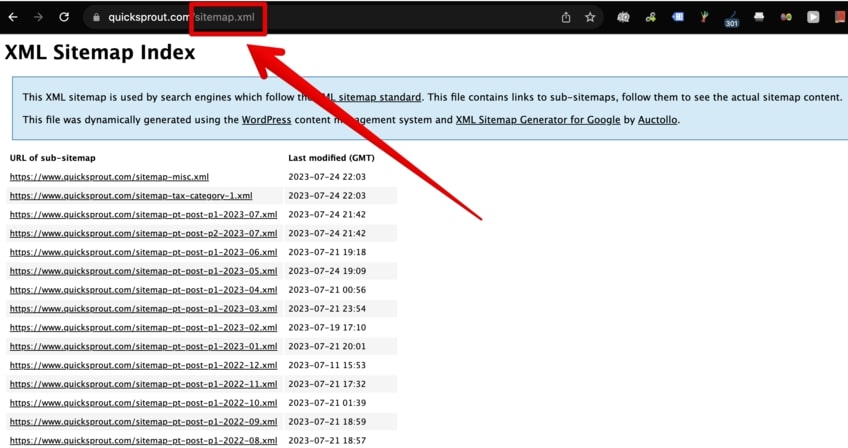
CMSs are often complex, multi-faceted utilities that sometimes require specialized courses to learn how to use them. Don’t beat yourself up if you don’t figure everything out right away.
26. Check Your Robots.txt File
As suggested by the extension in its name, robots.txt is a type of text file used to optimize how search engines crawl your website. It’s usually a publicly available file, which you can access by typing “robots.txt” after the top-level domain in the URL address bar.
Robots.txt lives somewhere in the main folder on the backend, which is also known as the root directory of your site. Oddly enough, although most modern websites already have a robots.txt file, search engines will still crawl your website even if you don’t.
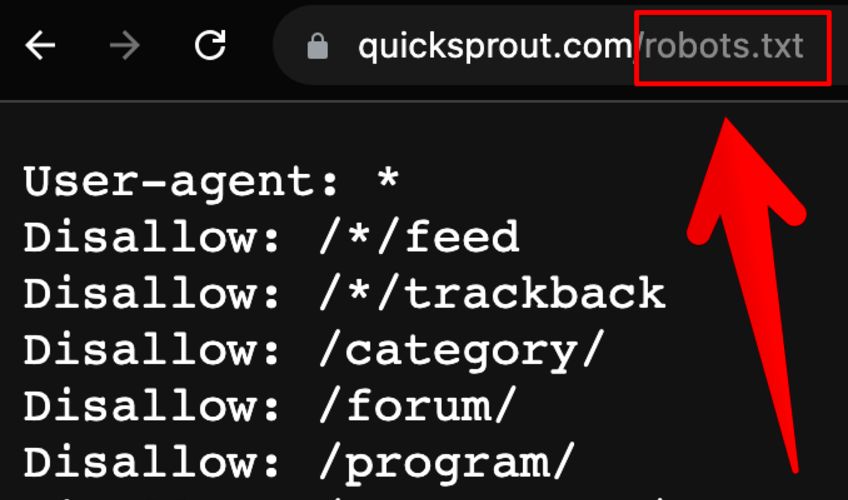
Smaller sites and newer blogs featuring a low volume of published content don’t really have to worry about optimizing their robots.txt file, but if you run a monster site like Amazon or Engadget, then you need to start considering what is known as your crawl budget.
Crawl budget denotes the time, speed, and amount of resources Googlebot spends on examining the pages that live nested under your blog’s domain. If you have thousands of different pages that extend every which way like vines on a dilapidated building, chances are Googlebot won’t have the time to crawl and index all of the pages in their full glory.
If you’re wondering how to optimize the robots.txt file for your blog, it kind of depends on the type of blog that you’re running in the first place—but a simple rule that you can always follow is to have a valid sitemap with open access to search engine crawlers.
Additionally, in robots.txt, every page that isn’t explicitly disallowed will be allowed to get crawled and indexed by Googlebot. A good idea would therefore be to disallow pages like Category, Wp-admin, or Privacy because they serve no real search value to your readers.
27. Connect Your Blog to Google Analytics
Google Analytics (GA) is a very powerful tool that gives you a granular look at how your blog is performing over a given time. Currently, the old analytics client has been dissolved in favor of the current Google Analytics 4 (GA4) client.
If you already had your blog connected to Google Analytics before July 1, 2023, then you have to perform some additional actions to transition your properties from the old client to GA4. A good place to read more about this process would be our very own GA setup guide.
In a nutshell, the benefits of GA4 compared to the GA version of old include:
- Better privacy and improved security
- Event-based tracking instead of session-based tracking
- Improved UI and UX
- Simplified goals
- Improved analysis across the board
If you want to succeed in the blogging industry, it requires diligent rank tracking and following site metrics on a regular basis. GA4 comes straight from the mothership, so it will help you do just that.
28. Connect Your Blog to Google Search Console (GSC)
GA’s little cousin is Google Search Console—a collection of tools that monitor your website’s overall health as well as a bunch of other parameters that include page indexing, redirects, subdomains, top-level domains, traffic performance, and mobile rendering issues.
Additionally, GSC can also help you analyze your incoming traffic, check the keywords your pages are mostly associated with, and monitor your CTR as well.
Connecting your property to GSC requires multiple steps which you can read more about in our detailed GSC guide for SEO. Overall, this can be a useful tool for keeping an eye on your site, and GSC can email you automatically if it finds any issues.
29. Improve Your Blog’s Loading Time
We’ve briefly touched upon website performance in a previous point on optimizing media, but site speed is also critical for SEO.
The folks at Google are sticklers when it comes to page loading time. While the consensus regarding acceptable server response times lands somewhere around two seconds or less, Google aims for times under half a second!
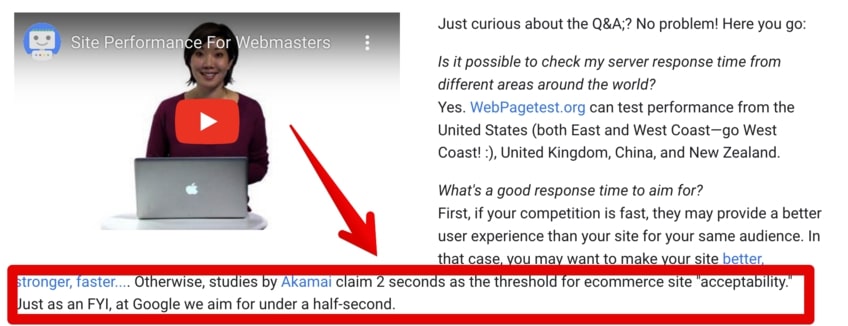
Improved page loading time is an important ranking factor to take into serious consideration. Users want fast websites, dislike slow websites, and are increasingly dropping their attention spans in the era of instant gratification and doomscrolling.
To check your current blog loading speed, hop on over to the speedmasters at Google and have at it!
30. Use Simple Language
Writing in simple, easy-to-understand language is one of the main cornerstones of an inclusive online user experience.
The difficulty of reading and comprehending a given chunk of text is sometimes calculated on a numerical scale called the Flesch–Kincaid readability scale. Higher scores indicate content that is easier to read, while lower scores (some passages of Moby Dick even go into the negative) represent text that is relatively harder to read.

Depending on your blog’s goals, the current recommendation is to write content that could easily be understood by 8th-grade students. On the numerical scale, this equates to a reading difficulty between 50 and 60.
So, how do you make sure to produce easily discernible content without sacrificing the tone, engagement, and writing flow of your blog posts?
There are a couple of solutions. You can use tools like Grammarly, Semrush SEO Writing Assistant, or a different set of eyes (a dedicated copy editor) to check the readability score of your draft.
However, the notion of writing in a simple language does not make you the 007 of creative writing—you don’t get a license to kill all the fun in a given text.
At the end of the day, Google still values quality over readability, although one of these does not exclude the other.
31. Beware of Negative SEO
It’s no secret that SEO has been rapidly evolving throughout the past couple of years. And as the industry expands, so too do the ways in which competitors and malicious actors can sabotage the efforts of unsuspecting bloggers.
The tendrils of negative SEO extend far and wide across the search landscape. Some of the nefarious tactics that exist to lower your search rankings include comment spam links, toxic backlinks from link farms, duplicate content, and fake negative reviews.
There are a couple of ways for pushing back and trying to prevent negative SEO, including:
- Being upfront with Google by submitting your properties (blogs) to GA4 and GSC
- Stripping the power away from spammy, negative, and harmful links by using GSC’s disavow tool
- Keeping at least one backup of your website to roll back to it if there’s no other solution in sight
- Setting up multi-factor authentication both for your most valued blogs and your personal accounts
- Following Google’s rules, such as never using private blog networks (PBNs) to generate a constant influx of backlinks to your blog
- Being mindful of unvetted CMS plugins, as a large number of these have been known to contain a critical security exploit that hackers can use to take over control of your site
It’s possible that the mere threat of such attacks may overwhelm new bloggers, but taking the preemptive precautions will ensure that your risk level is low.
Conclusion
It should come as no surprise that running a well-oiled, SEO-optimized blog is a challenging, yet rewarding undertaking—just like pickling gherkins.
With so many factors involved, from following E-E-A-T best practices and optimizing for voice search to monitoring analytics and warding off the bad juju of negative SEO, it’s no wonder that getting a high rank in search results takes more than luck.
So, are you ready to take the plunge and test some of these 31 tactics in the unforgiving battleground of search?
See you on the first page, if so!