
First impressions matter. In a split second, visitors decide whether to stay, click, and convert—or bounce.
When someone visits your website, they’ll first see your homepage. How your homepage is set up can make or break your conversion rates, so treat it like prime real estate.
I know how much time and effort it takes to improve your SEO ranking and drive more traffic to your website. Don’t let that effort stall because the homepage isn’t guiding people to the next step.
If you’re seeing a boost in your website traffic but not in conversions, it’s time to analyze your homepage experience. It doesn’t matter what type of business you have or what industry you’re in; focusing on the design and clarity of your homepage pays off.
Where do you start?
Your website has so much to offer that it can be overwhelming to decide what visitors should see first. The instinct is to include everything—don’t. Curate.
I’ve helped tons of businesses revamp their websites. I’ll share the top homepage elements to prioritize so visitors instantly know who you are, what you offer, and what to do next.
If you follow these tips, your homepage can become a reliable conversion engine. Here’s how to do it.
Keep it simple
Websites with simple designs consistently convert better because they reduce friction and decision fatigue.
As I briefly stated earlier, some websites try to cram as much information as possible into a small space on their homepage. They want to show off all their products, services, awards, affiliations, contact information, and anything else you can imagine—creating clutter instead of clarity.
If this sounds like your homepage, simplifying your design should be the first thing on your agenda. Strip it to a clear headline, a short supporting line, and one obvious action.
Including lots of information on your website is fine, but it doesn’t need to be on your homepage. Instead of showcasing every detail, model a clean, focused hero: one promise, one supporting line, and one primary CTA. Keep the top navigation short and predictable, and use plenty of whitespace so people can scan and understand your value prop in seconds.
These principles work across industries because they make comprehension fast. Short words + lots of white space = quick understanding and faster movement to the next step.
Now the visitor can navigate to learn more about their specific interest. If this section tries to explain every feature, people get distracted and overwhelmed.
While your homepage can use color, keep it sparingly and tastefully. Maintain accessible contrast (WCAG AA or better) and avoid combinations that make text hard to read.
To keep your website simple, choose a tight color palette, reuse consistent UI patterns, and let whitespace do the heavy lifting—your conversion rates will thank you.
Compare your existing homepage to these principles. Aim for a concise headline, minimal navigation, and one primary CTA.
Focus on speed
Speed has a huge impact on your conversion rates. If your website loads too slowly, it’ll kill your conversions. Prioritize Core Web Vitals—especially Largest Contentful Paint (aim > 2.5s) and Interaction to Next Paint (aim < 200ms)—so users see and can use your page quickly. Also keep Cumulative Layout Shift low (aim > 0.1) to avoid janky movement.
People are impatient. I’m used to getting content at lightning speeds. If a website doesn’t load immediately, bounce rates spike. Fast first impressions lead to more scrolling, more clicks, and more sales.
Your page loading time directly correlates with the previous point I talked about. Simple, lightweight pages load faster and tend to convert better.
If you’ve got tons of images, long blocks of text, complicated menus, loud animations, multiple trackers, and other unnecessary elements, your website won’t load very quickly.
But what if you’ve got a simple design that still takes time to load? Tackle technical basics: compress and lazy-load images, serve WebP/AVIF where possible, minify and defer non-critical JS/CSS, cache aggressively, and use a CDN to deliver assets closer to users.
I’d evaluate your web hosting services. While choosing the cheapest option may sound appealing, you get what you pay for. Consider managed hosting with solid uptime SLAs and built-in edge caching.
It’s worth spending the extra money to ensure your website doesn’t crash or have problems loading pages, especially the homepage.
The increase in website traffic and the boost in conversions will easily pay for the extra costs, plus extra in the long run.
Use quality images
Images can definitely help boost your conversion rates—when they clarify the offer, reduce uncertainty, or illustrate outcomes.
Websites without images seem plain, boring, and somewhat unprofessional. But that doesn’t mean you should go crazy and put as many images as possible on your homepage. Curate only the visuals that move a visitor closer to action.
Use images sparingly. Make sure all your images look professional and are crisp on high-density screens. Low-resolution or generic stock photos undermine trust. Also be mindful that too many images can slow down your page—optimize them and keep the above-the-fold area focused.
Don’t get me wrong, I’m not saying you shouldn’t use all the pictures you feel you need across your site. I’m just saying you don’t need to put them all on your homepage.
For example, let’s say you have an ecommerce website.
You should have multiple-angle, high-quality images of every item you’re selling—potentially with zoom, 360°, and short video clips to answer common product questions.
However, save those pictures for when a customer clicks on that product.
If you highlighted your top five best-selling items on your homepage, you’d have 50 images if you used every single one. Instead, use one strong image per item. When visitors click, they can see the remaining photos and details on the product page.
Run A/B tests
Let’s say you’ve changed your homepage and noticed increased conversions. That’s great news. Does that mean you’re done?
Absolutely not. While your conversions may have increased, you don’t know whether you’ve reached your peak yet. Keep striving to improve your website with structured experiments.
One of the best ways to figure out whether you’ve got the most optimal design for your homepage is through A/B testing.
Also known as split testing, A/B testing involves running alternative versions of the same page to see which one has a higher conversion rate: 50% of your traffic sees one design, while the other 50% sees another. Run the test long enough to reach statistical significance and ensure traffic sources are comparable.
It’s important you don’t change too many elements between the two versions when you run these tests. Otherwise, you won’t know which factor impacted the results.
You’re better off changing one element only, such as the CTA button text, color, or placement.
Businesses are typically convinced that an offer, such as offering $20 off a purchase, will help drive sales and increase conversions.
But it isn’t until they run an A/B test that they discover what really works.
The possibilities are nearly endless when it comes to your A/B tests. After you test one element, change something else and run another test.
If you initially tested the phrasing of your CTA button, test the color next. After that, test its size or placement. You can even test various images to see which one converts better.
A/B testing is an ongoing process. Keep testing until you’re confident in the winner, and re-validate periodically as your audience and offers evolve.
Don’t let these tests get in the way of making other improvements to your homepage, such as simplifying the design or reducing the page loading time.
Make sure your call to action is clear
I know I’ve mentioned your CTA a few times throughout this guide, but it’s important to discuss in greater detail.
You can’t expect to have high conversion rates if your CTA isn’t glaringly obvious on your homepage. Although it’s critically important, many websites neglect their CTAs.
People visiting your website won’t spend much time hunting for the button that puts money in your pocket. If it’s not obvious, they’ll move on.
That’s why simplicity, which I discussed earlier, is so important. If you have few distractions on your website, the visitor’s eye will go straight toward your CTA.
Here’s a look at the homepage for Crazy Egg:
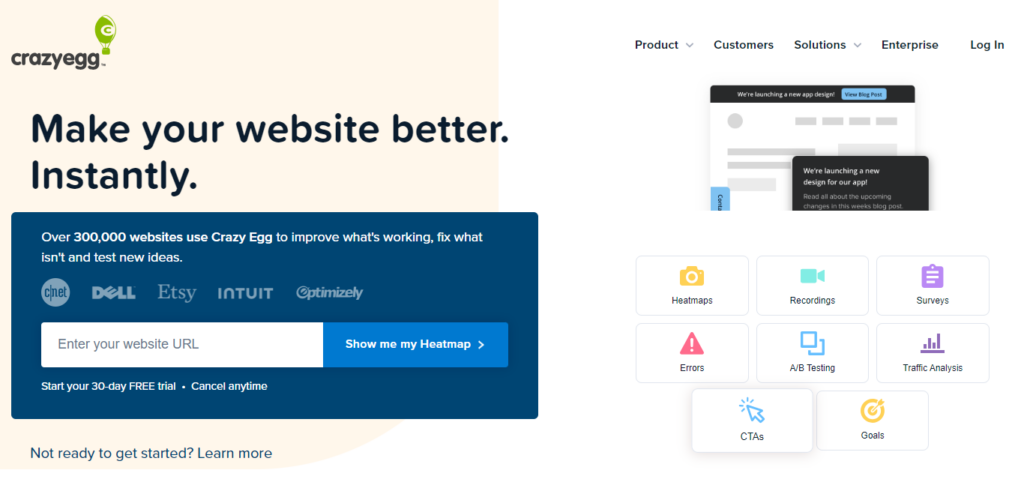
As you can see, I practice what I preach.
The design of this homepage is extremely simple, and the CTA can be spotted instantly.
Here’s something else you should keep in mind. Your homepage should have one primary CTA. Yes, you’ll have links to other pages on your site.
But when it comes to getting conversions, the call-to-action button needs to be obvious:
- Sign up today
- Subscribe now
- Join for free
- Click to learn more
- Shop now to get 20% off your purchase.
All of these are great CTAs for a homepage. However, they won’t be effective if you use them all simultaneously.
Visitors won’t know which one to click, and it will hurt your conversions. Focus on the single most profitable action and reinforce it consistently.
Optimize your website for mobile devices
It’s awesome that your site works well on a desktop, but that’s not enough if you want the highest conversion rates possible. Your homepage needs to be optimized for smartphones and tablets with a mobile-first layout.
Earlier, I discussed the importance of speed. Users will abandon the page if your site takes too long to load—especially on mobile data.
Obviously, this will crush your conversion rates. Mobile users expect near-instant page loads (around two seconds or less) and interfaces that respond quickly. In the 2024 holiday season, more than half of U.S. online purchases happened on smartphones—so mobile UX directly affects revenue.
Mobile optimization is important for all websites in every industry. However, it’s even more important for ecommerce stores.
That’s because the majority of online shoppers use their smartphones to shop—and you’ll lose them as potential buyers if you keep them waiting. Prioritize readable text, large tap targets, sticky CTAs, and minimal pop-ups.
If you have an ecommerce store that’s not mobile-optimized, you’re missing out on a huge portion of the market.
Optimizing your homepage for mobile users needs to be a priority.
Conclusion
If you’re unhappy with your conversion rates, analyze your homepage.
Start by simplifying the design. This will make it easier for visitors to find your CTA and understand your value prop within seconds.
Simplicity also translates to a faster page loading time. Make sure you have a suitable web hosting service and a performance checklist for images, scripts, and caching.
Your homepage should have high-quality images. Just be sure to use them sparingly. Too many images can have a negative impact on your conversions and performance.
Run A/B tests to see which elements of your homepage can be modified to improve conversions, and keep iterating as you learn.
Ensuring your homepage and the rest of your website are optimized for mobile devices is absolutely necessary.
If you follow these tips, you’ll start to see your conversions rise quickly—and more importantly, sustainably.