
If you want more local leads, your Google Business Profile needs to be one of the first things you fix.
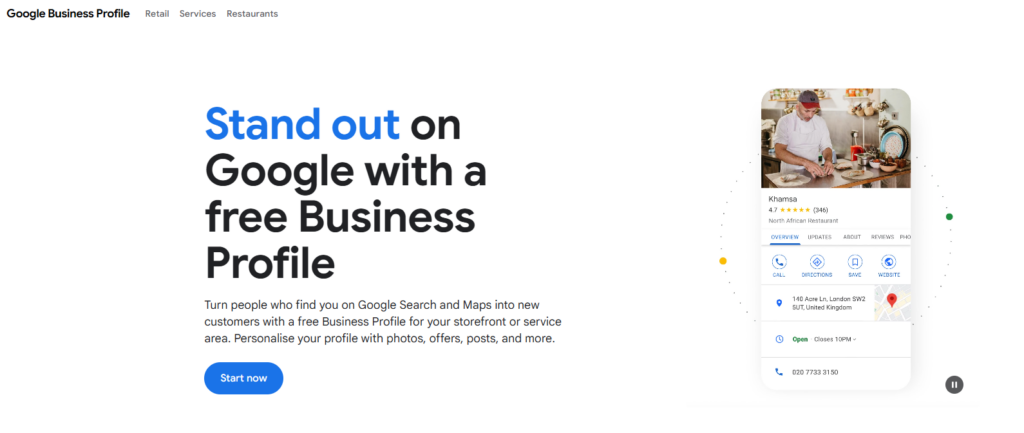
For most service businesses, it is the difference between showing up when people search “near me” and getting buried under better-optimized competitors.
That is because your Google Business Profile does a lot of heavy lifting at once. It influences how your business appears in Google Maps, how much information potential customers see before they ever visit your website, and whether people trust you enough to call, click, or book.
A weak profile makes everything harder.
A strong one gives you a better shot at showing up for relevant local searches and converting the traffic you already earn.
In this guide, I’ll walk you through exactly how to optimize your Google Business Profile in 2026 so it can drive more calls, quote requests, and booked jobs.
Why Google Business Profile matters so much
A lot of local marketing tactics still matter.
Your website matters. Reviews matter. Local links matter. Your service pages matter.
But your Google Business Profile is still one of the most visible local assets you own.
When someone searches for a plumber, roofer, dentist, lawyer, med spa, or HVAC company in their area, Google often shows local results before they ever click into a website. That means the first impression is happening inside your profile.
People can see:
- your business name
- your reviews
- your star rating
- your business hours
- your phone number
- your location or service area
- your photos
- your services
- your website link
- your directions link
- your Q&A
- your updates
That is a lot of buying-decision material packed into one place.
If your profile is incomplete, outdated, sparse, or untrustworthy, you lose business before your website even gets a chance.
Who should care about this most
This matters most for businesses that depend on local intent, including:
- home service companies
- healthcare providers
- legal practices
- fitness businesses
- beauty and wellness businesses
- restaurants and hospitality businesses
- professional services
- repair companies
- local retailers
- service-area businesses
If customers search for what you do plus a city, ZIP code, neighborhood, or “near me,” this post applies to you.
What a well-optimized profile actually does
A good Google Business Profile helps in three ways:
First, it improves your chances of appearing for the right local searches.
Second, it gives customers confidence that your business is legitimate, active, and worth contacting.
Third, it makes taking action easier by putting your phone number, booking link, directions, and service details right in front of them.
That means optimization is not just about rankings.
It is also about conversion.
Step 1: Claim and verify your profile
This sounds obvious, but you would be surprised how many businesses either never claim their profile or let an old employee, agency, or web vendor control it.
Before you optimize anything, make sure your business has:
- an officially claimed profile
- the correct owner access
- the correct manager access
- a business email you control attached to it
- a recovery process in place in case access gets lost
Do not build local SEO on top of an account you do not fully control.
Step 2: Choose the right primary category
Your primary category is one of the most important settings in the whole profile.
This tells Google what your business is primarily about.
Do not pick a broad category because it sounds impressive. Pick the category that best matches the core service you want to rank for.
For example:
- A plumbing company should usually use Plumber
- A personal injury firm should usually use Personal injury attorney
- A med spa should usually use Medical spa
- An HVAC company should usually use HVAC contractor
After that, you can add relevant secondary categories that reflect your real services.
This is not the place to get creative. It is the place to get accurate.
Step 3: Fill out every important field completely
Half-finished profiles do not inspire trust.
You want your profile to look complete, current, and real.
That means filling in all the important details, including:
- business name
- category
- address or service area
- phone number
- website URL
- hours
- holiday hours
- appointment link
- business description
- services
- products if relevant
- attributes
- opening date if applicable
This is basic, but it matters.
When your profile is complete, both Google and users have more context.
Step 4: Write a business description that sounds human
Your description should explain what you do, who you serve, and what makes you credible.
It should not sound stuffed with keywords or written by someone trying too hard to impress Google.
A strong business description usually includes:
- your main service
- your service area or city
- your ideal customer
- your experience or specialization
- one or two trust points
- a natural mention of key offerings
Here is the kind of direction you want:
“We provide residential and commercial HVAC repair, installation, and maintenance throughout the Phoenix metro area. Our technicians handle everything from emergency AC repairs to full system replacements, with fast response times and upfront pricing.”
That is better than generic filler like “We are committed to excellence and customer satisfaction.”
Step 5: Set your service areas correctly
If you are a service-area business, this matters a lot.
You want your profile to reflect the places you actually serve, not every city within 100 miles that sounds nice on paper.
Keep your service areas realistic and aligned with your operations.
Do not pretend to serve locations where you do not actually take jobs.
That kind of mismatch hurts trust and leads to bad customer experiences.
Your website should support these service areas too. If your profile says you serve 12 cities, your site should make that believable.
Step 6: Add all of your real services
A lot of businesses skip this or only add one or two general items.
That is lazy, and it leaves useful relevance signals on the table.
List your real services clearly.
For example, a roofing company might include:
- roof repair
- roof replacement
- storm damage repair
- leak detection
- roof inspection
- emergency tarping
A dental practice might include:
- teeth cleaning
- dental implants
- Invisalign
- root canals
- emergency dentistry
- cosmetic dentistry
This helps Google understand what you do, and it helps users confirm they are in the right place.
Step 7: Add better photos
Photos do more than make your profile look nice.
They help prove that you are a real, active business.
They also reduce hesitation.
People want to see who they are hiring, where they are visiting, or what kind of work you actually do.
Good photo types include:
- storefront photos
- office photos
- team photos
- trucks or branded vehicles
- before-and-after work
- completed projects
- equipment
- treatment rooms or workspaces
- product displays if relevant
Bad photo strategy is either no photos or generic stock-looking images that tell people nothing.
Your photos should make the business feel tangible.
Step 8: Build a review system instead of randomly asking
If you want stronger profile performance, you need more than a few old reviews.
You need recent reviews on a steady basis.
That means building a repeatable process.
The simplest review system looks like this:
- complete the job
- confirm the customer is happy
- ask right away
- send a direct review link
- make the request short and easy
- follow up once if needed
- respond when the review comes in
Do not wait until you “have time” to ask.
Make it part of the workflow.
The businesses that consistently build reviews tend to look more active, more trusted, and more competitive.
Step 9: Respond to reviews like a normal person
Too many businesses either ignore reviews or respond with robotic templates.
Both are weak.
A good response should feel real and specific.
Thank the customer. Mention the service if appropriate. Keep it short. Do not force keywords into every reply.
Good example:
“Thanks, Mike. Glad we could help with your same-day garage door repair. We appreciate you calling our team.”
That sounds better than:
“Thank you for your positive feedback. We value your business and strive to provide excellent customer service.”
One sounds human. One sounds canned.
Guess which one builds more trust.
Step 10: Use questions and answers strategically
The Q&A section is underrated.
Many businesses ignore it completely, which means users may only see random public questions or no useful information at all.
This section is a good place to address common concerns like:
- Do you offer emergency service?
- Do you provide free estimates?
- What areas do you serve?
- Do you work weekends?
- Do you accept insurance?
- Do you offer financing?
These are the kinds of questions that remove friction before someone calls.
Think of Q&A as another conversion asset, not just another field to fill.
Step 11: Keep your hours accurate
Nothing makes a business look sloppy faster than wrong hours.
If your profile says you are open and someone arrives or calls when you are not, that is a trust hit you did not need.
Keep standard hours updated.
Also update holiday hours, seasonal hours, and emergency availability if those apply to your business.
This is simple maintenance, but it matters more than people think.
Step 12: Add booking links or conversion paths where possible
The easier it is to take action, the better.
If your business can support direct booking, consultation requests, estimate requests, or appointment scheduling, make that path obvious.
At minimum, your profile should make it easy for someone to:
- call you
- visit your site
- request service
- book an appointment
- get directions
Do not make users hunt.
Step 13: Keep the profile active
A dead-looking profile is not reassuring.
You want it to look maintained.
That means regularly updating:
- photos
- service information
- holiday hours
- review responses
- service offerings
- business details if anything changes
You do not need to obsessively post every day.
You do need to make sure the profile does not look abandoned.
Step 14: Match your profile to your website
Your Google Business Profile and your website should tell the same story.
That means your business name, location information, service area, services, and trust signals should align across both.
If your profile says one thing and your website says another, that creates confusion.
A strong local presence is built on consistency.
Step 15: Track what actually matters
Do not just stare at your star rating and hope for the best.
Track outcomes.
Look at:
- calls
- website clicks
- direction requests
- booked appointments
- lead form completions
- review count growth
- review recency
- branded and non-branded local visibility
The point of profile optimization is not to create a prettier listing.
It is to drive more business.
Common Google Business Profile mistakes
Here are the biggest mistakes I keep seeing.
Choosing the wrong category
This weakens relevance from the start.
Leaving fields blank
Incomplete profiles look weak and reduce trust.
Using poor-quality or outdated photos
Old or generic visuals make the business feel inactive.
Ignoring reviews
That sends the message that customer experience is not a priority.
Listing too many service areas
If your coverage sounds unrealistic, people notice.
Using the profile without supporting website pages
Your profile can do a lot, but it works better when your site backs it up.
How to know your profile is improving
You should expect progress to show up in practical ways, such as:
- more calls from profile views
- more website visits from Google Maps or local search
- more customer actions
- better review momentum
- more visibility for specific services
- better lead quality
This is especially true when profile improvements are paired with stronger local landing pages and a better review process.
Final thoughts
If you are serious about local SEO, optimizing your Google Business Profile is not optional.
It is one of the fastest ways to improve how your business appears, how trustworthy it looks, and how easily people can contact you.
And unlike some marketing tactics, this is not complicated.
It is mostly about accuracy, completeness, trust, proof, and consistency.
Do those well, and your profile becomes more than a listing.
It becomes one of your best local lead-generation assets.