
Web hosting services supply the storage, networking, and compute power your site or app needs to stay online. The two most common entry points—cloud and shared hosting—look similar at first glance, but they behave very differently once traffic grows or requirements change. This post breaks down the core differences so you can choose confidently for 2026 and beyond.
While cloud hosting tends to fit more use cases long-term, the “best” choice depends on your traffic patterns, budget, and how much control you want. A side-by-side comparison is the only way to land on the right answer for your situation.
Below you’ll find the key differences between cloud and shared hosting—what the architecture looks like, how resources are allocated, how each scales, the pricing models you’ll encounter, and what latency and reliability look like in practice.
1. Hosting Architecture
The clearest distinction between cloud and shared hosting is architectural. Providers deliver them in fundamentally different ways, so once you know how each is built, it’s hard to mix them up.
Shared hosting sits in the “traditional hosting” family alongside dedicated servers and virtual private servers (VPS). In traditional setups, your site lives on a single physical machine inside a data center. That physical server is where your files, database, and web server actually run.
To differentiate shared hosting from other traditional types:
Shared hosting places many unrelated websites on one server. Everyone draws from the same pool of CPU, RAM, disk, and network throughput. This multi-tenant model keeps costs low, but it also introduces the classic “noisy neighbor” problem when one site temporarily consumes more than its fair share.
Dedicated hosting gives one customer full use of one physical server. No other tenants compete for resources, so performance is predictable, but you pay for the whole machine whether you use all of it or not.
Virtual Private Server (VPS) hosting splits a single physical server into multiple virtual machines (VMs). Each VM has reserved slices of CPU, RAM, storage, and bandwidth, giving you isolation and root-level control without buying an entire dedicated box.
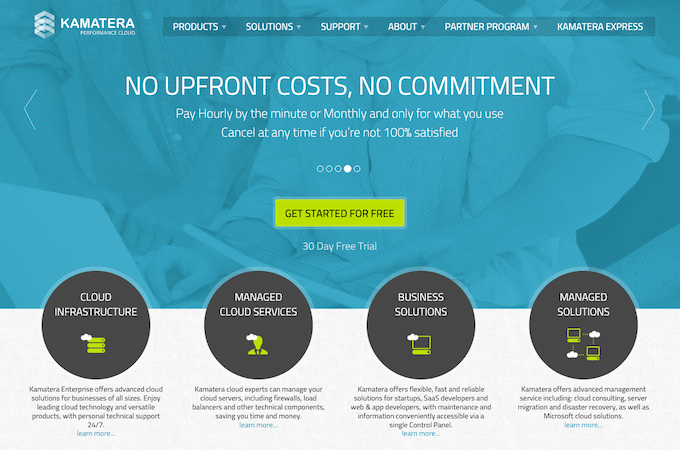
Now to cloud hosting, a model that has surged in adoption over the last decade. Conceptually it’s closer to VPS than to shared hosting because it also relies on virtualization. However, instead of carving one physical server into many VMs, cloud platforms pool resources across many physical servers—often across multiple availability zones—and present them to you as virtual servers (instances) that can move or replicate for resilience.
Virtualization here means software abstracts the underlying hardware so one physical server can run many isolated VMs, each with its own operating system and resource allotments. In cloud environments, orchestration layers schedule those VMs across clusters of machines, so your apps aren’t tied to a single piece of hardware.
That’s the key divergence from VPS: a VPS is typically confined to one physical host, while a cloud instance runs on a fault-tolerant fabric of hosts. If a node fails, cloud orchestration can restart workloads elsewhere, and storage is commonly replicated—drastically reducing single-server risk compared to shared/VPS.
Cloud hosting lets you treat a fleet of servers as one logical platform. Your data and configuration are stored on resilient storage systems, and the compute layer can shift under the hood without your site going offline. Interconnected nodes and managed networking make your environment highly available by design.
In short: shared/VPS/dedicated = single-server mindset; cloud = distributed, self-healing infrastructure.
2. Resource Allocation
Resource allocation directly affects performance—how quickly pages render, how many concurrent users you can handle, and how stable the site feels during busy periods. CPU, RAM, disk I/O, and network throughput are the big levers.
In shared hosting, all tenants divide the same server’s resources. It’s cost-effective because everyone shares the bill, but it also means your ceiling is whatever the host allows for your plan, and contention can appear when another site spikes usage. Hosts often advertise “unmetered” features, but they enforce fair-use limits to protect the box.
Shared plans are also fragile during sudden traffic spikes. If your post goes viral, you can exhaust your per-account limits quickly, triggering slowdowns or temporary suspensions. Likewise, another customer’s burst can impact your site because you share the same hardware.
To curb abuse, shared hosts cap per-account CPU seconds, memory, processes, and disk I/O (often via LVE/CloudLinux or similar). Those caps are necessary for stability but they don’t automatically flex upward for your once-in-a-while surges.
Sharing isn’t inherently bad—lightweight sites and hobby projects rarely need dedicated resources. For a simple brochure site, the savings often outweigh the occasional performance dip.
Cloud hosting, by contrast, allocates dedicated vCPU/RAM to your instance and lets you adjust those allocations when demand changes. You don’t get “infinite” resources, but you do get elastic resources within well-defined quotas, and you can add more with a plan change or autoscaling policy rather than migrating servers.
Because many cloud platforms support autoscaling, they can launch additional instances when traffic climbs and wind them down when it recedes. That elasticity keeps performance steady during peaks without you babysitting the server.
3. Scalability
Scalability is a host’s ability to increase (or decrease) resources as your needs change. If you’re aiming for steady month-over-month growth, you want a platform that can expand capacity without re-architecting your stack.
Shared hosting generally doesn’t scale in place. Once you hit the plan’s ceilings, your options are to throttle usage, wait out the spike, or upgrade to VPS/dedicated/managed cloud. Some shared plans offer “burst” bandwidth or CPU, but it’s capped to protect the server.
Scalability also means not overbuying. On a rigid plan, you might pay for capacity you rarely touch. That money could be better spent elsewhere if the platform allowed you to scale down during slow periods.
Cloud platforms build scalability into the fabric. Because your instances run atop clusters, there’s a ready pool of resources to draw from. You can add CPU/RAM to an instance, scale vertically to a bigger instance type, or scale horizontally by adding more instances behind a load balancer—often with a few clicks or a policy.
The result is near-instant capacity changes without migration downtime. That’s ideal for launches, seasonal sales, promo campaigns, and any business with spiky or unpredictable traffic.
Bottom line: shared scales by switching plans; cloud scales by resizing or multiplying resources on demand.
4. Pricing Structure
Pricing models differ just as much as the tech. Shared hosting is usually a fixed monthly fee with big introductory discounts for longer terms. Renewal rates are higher than the promo price, so read the fine print before committing to multi-year contracts.
Most shared plans bundle a set amount of storage, memory/process limits, and unmetered (but not unlimited) bandwidth for a low entry price. It’s predictable and simple, which is a big reason shared remains popular for small sites.
Shared providers typically manage server maintenance, security patches, and OS updates for you. Many include cPanel or a custom panel so you can manage files, databases, email, and domains without touching the command line.
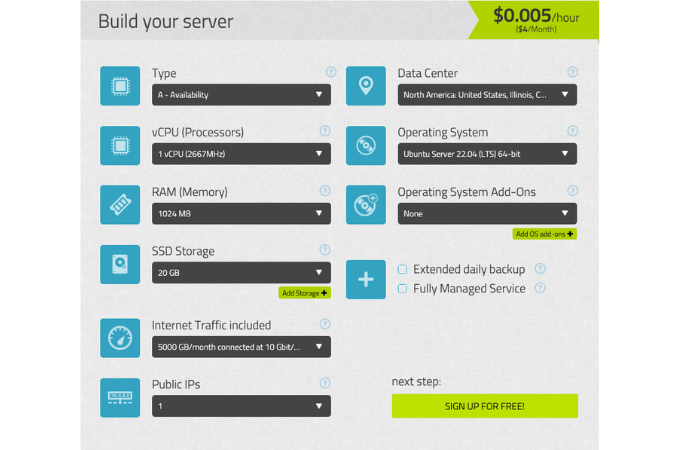
Cloud hosting more often follows a pay-for-what-you-provision model. You choose instance size (vCPU/RAM), storage type and capacity, bandwidth/egress, and add-ons like load balancers or managed databases. Your monthly bill reflects those choices, and you can optimize costs by rightsizing instances, using object storage for large assets, and turning off non-production resources when idle.
Also remember that “cloud” describes several service layers:
Software as a Service (SaaS) delivers complete applications you access via the web. It isn’t web hosting in the traditional sense, but many site owners use SaaS tools (e.g., analytics, email, CRM) alongside their hosting.
Platform as a Service (PaaS) abstracts servers so you deploy code without managing the OS. Many managed WordPress/cloud providers fall here—they handle OS, PHP, web server, and security while you focus on the site.
Infrastructure as a Service (IaaS) gives you the most control. You provision virtual machines, networks, and storage, pick your OS, and configure everything. This is the classic “cloud server” model used for custom stacks or high-control WordPress setups.
Shared hosting typically costs less than cloud at the very low end because you’re splitting a single server with many tenants. Even so, entry-level cloud plans from mainstream providers have become accessible for small businesses, especially when you factor in the flexibility to right-size resources over time.
If you’re comparing offers, look beyond sticker price: consider renewal rates, traffic/egress charges, backups, staging sites, CDN, security tools, and support levels—those often determine the true total cost.
5. Latency
Latency is the time it takes for data to travel between your visitor and your server, typically measured in milliseconds. It’s influenced by physical distance, routing through load balancers and firewalls, and how congested networks are. Lower latency means snappier page loads and stronger Core Web Vitals—especially better Interaction to Next Paint (INP) and Largest Contentful Paint (LCP).
Server location matters. Shared hosting generally anchors your site to one data center. That’s fine for audiences near that location, but users far away will wait longer for responses unless you layer on a content delivery network (CDN). Many shared hosts now bundle basic CDN integration, but your origin is still single-homed.
Cloud hosting minimizes latency by letting you deploy in regions closer to users and by pairing origins with built-in or add-on CDNs (often using HTTP/3/QUIC and Anycast routing). Traffic is routed to the nearest edge or region, reducing round-trip times and smoothing performance globally.
Similarities Between Cloud Hosting and Shared Hosting
Despite their differences, cloud and shared hosting share several traits.
Most providers publish an uptime commitment in a Service Level Agreement (SLA). The percentage—commonly 99.9% or higher—indicates how reliably your site should be available over a given period and what credits you may receive if they miss the mark.
Both models can be “managed.” With managed plans, the host handles OS updates, security patches, routine maintenance, and often backups and monitoring. Many also provide a ready-to-use stack so you can launch quickly without deep server knowledge.
In either case, you’re buying compute, memory, storage, and bandwidth to power your website. The quantities and isolation differ, but the building blocks are the same.
Security features are widely available across tiers, including free SSL certificates, web application firewalls, DDoS protection, and malware scanning. Even budget shared plans often include baseline protections; higher tiers add staging, automatic backups, and advanced hardening.
Finally, both offer customer support—typically via live chat, email, and sometimes phone. Response times and expertise vary by provider and plan level, so check what’s included before you commit.
Final Thoughts About Cloud Hosting vs. Shared Hosting
Cloud and shared hosting differ more than they overlap. For most growing sites, cloud hosting wins on performance, fault tolerance, and on-demand scalability. It’s designed to handle spikes gracefully and keep your site responsive worldwide.
Shared hosting still has a place: small, low-traffic sites; simple brochureware; early-stage projects; or anyone prioritizing the lowest monthly cost.
Whichever route you pick, evaluate the essentials: uptime track record and SLA, renewal pricing and any egress or overage fees, real-world performance (TTFB, INP, and LCP), scaling options, built-in security, backups and staging, CDN availability, and support quality. Align those factors with your traffic today—and where you expect it to be in 12 months—to choose the hosting model that will actually help you grow.