
Customer relationship management (CRM) software helps companies deliver better products, services, and experiences by keeping every interaction and data point in one place so your team is always aligned.
Whether you’re a solo founder or a global enterprise, the right CRM helps you build stronger customer relationships, shorten sales cycles, and coordinate marketing, sales, and service across every channel.
Below, I break down the features, benefits, and plan details for today’s top CRM platforms, along with practical selection advice so you can confidently choose the best CRM for your business.
The 11 Best CRM Software Solutions
- Nextiva — Best for simplifying sales data and cross-team processes
- HubSpot — Best all-around CRM for varied needs and fast ramp-up
- monday CRM — Best for centralizing sales data with simple dashboards
- Salesflare — Best for prospect management and hands-off data capture
- Zoho CRM — Best for a highly customizable, budget-friendly CRM
- Freshsales — Best for lead management and built-in comms
- Insightly — Best CRM with strong project management
- Apptivo — Best modular CRM you can expand as you grow
- Pipedrive — Best for simplifying and visualizing the sales process
- EngageBay — Best affordable all-in-one with service automations
- Salesforce — Best for deep integrations and complex needs
Best CRM Software Reviews
Nextiva — Best for Simplifying Sales Data and Processes
Nextiva gives sales leaders and reps a clean view of pipeline health, rep performance, and deal momentum—without hopping between tools. Its analytics surface who’s winning and which behaviors lead to wins, so you can coach with data and scale what works.
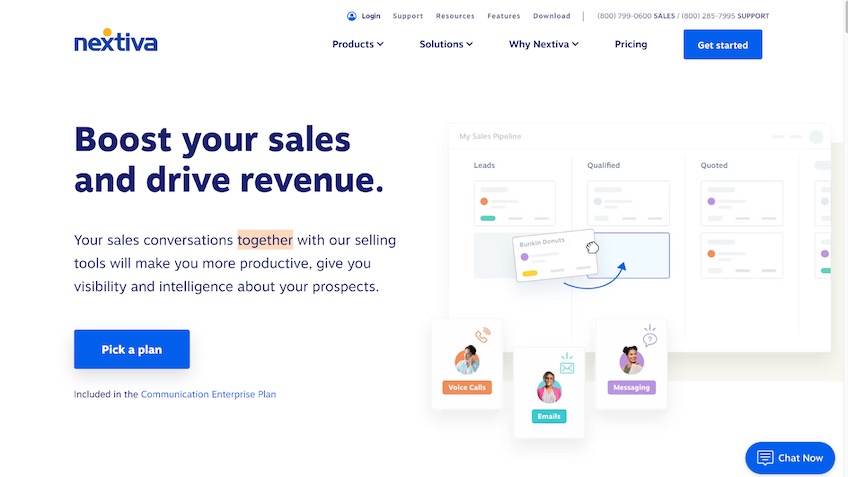
Highlights include customizable pipelines, automated tasks and follow-ups, call, email, and SMS logging, and team-level dashboards. Conversation history lives with each contact so any rep can jump in and keep momentum with full context.
Best for: Teams that want sales, calls, and analytics in one place. Considerations: Advanced CRM features are packaged with higher-tier communications plans; confirm the exact bundle you’ll need.
Pricing varies by users and billing term. Most sales teams pair the CRM capabilities with Nextiva’s Communications Enterprise plan. Check plans and promos here.
HubSpot — Best for Varying CRM Needs
HubSpot is the easy button for teams that need a powerful CRM that’s also friendly for first-time users. The free core CRM covers contact, company, and deal tracking; live chat; meeting scheduling; email templates; and basic reporting—enough to centralize your pipeline fast.
As you grow, you can add Sales, Marketing, Service, CMS, and Operations Hubs for automation, sequences, playbooks, advanced reporting, help desk, knowledge base, and more. The interface is clean, onboarding is guided, and the marketplace has thousands of vetted integrations.
Great fit for: Startups to mid-market teams that want a single platform for marketing, sales, and service. Keep in mind: Pricing scales by seats and contact tiers. Bundled CRM Suites streamline buying when you need multiple Hubs.
Paid tiers range by hub and contact volume. The CRM Suite is available in Professional and Enterprise bundles with advanced automation and reporting. For specific pricing, factor in your required seat count and contact tier.
monday CRM — Best for Centralizing Sales Data
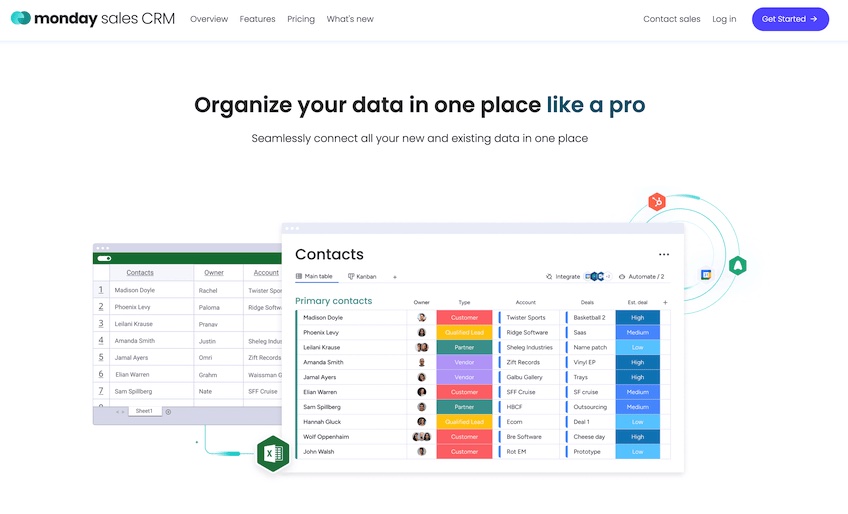
monday CRM (Monday Sales CRM) brings your leads, deals, emails, and activities into one configurable workspace, with dashboards that leaders love and reps actually use.
Create custom pipelines, automate hand-offs, and track forecasts vs. actuals without spreadsheets. Two-way email sync, activity tracking, and 200+ integrations (from DocuSign and Aircall to Microsoft 365) cut busywork so reps can sell.
Plans and highlights:
Basic CRM — $12 per seat per month
- Unlimited contacts, boards, and custom pipelines
- Unlimited free viewers and Kanban boards
- 24/7 support
Standard CRM — $17 per seat per month
- Advanced deal management with timeline, calendar, and map views
- Two-way Gmail/Outlook sync; DocuSign and Zoom integrations
- Automations (up to 250 actions/month)
Pro CRM — $28 per seat per month
- Sales forecasting and analytics dashboards
- Google Calendar sync; advanced views (chart & workload)
- Automations up to 25,000 actions/month; integrations with Mailchimp, HubSpot, and Facebook Ads
Enterprise CRM — Custom pricing
- Lead scoring, sales ops management, and multi-level permissions
- Enterprise governance, 250,000 automation actions/month
- Dedicated success manager and 99.9% uptime SLA
Start a 14-day free trial and build your pipeline in minutes.
Salesflare — Best for Prospect Management
Salesflare is a lean, B2B-focused CRM that auto-collects prospect data from emails, calendars, signatures, and the web, then updates contact records and timelines automatically.
Reps get instant context on opens, link clicks, and website visits, plus pipeline stages that are easy to drag, drop, and manage. It integrates tightly with Gmail and Outlook and supports triggered email sequences and simple automations—without heavy admin.
Pricing: Growth ($29/user/month), Pro ($49/user/month), and Enterprise ($99/user/month). Higher tiers unlock workflows, advanced permissions, and white-glove onboarding.
Try it free for up to 30 days or book a demo.
Zoho CRM — Best for a Customizable CRM
Zoho CRM is ideal when you need robust features that you can tailor without hiring a team of developers. You can customize modules, fields, record layouts, scoring rules, and dashboards—and tap into Zoho’s broader suite (Books, Inventory, Campaigns) as you grow.
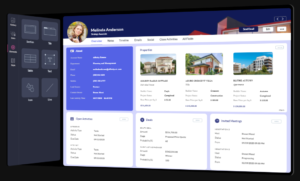
Plan overview:
Standard — $14 per user per month
- Scoring rules and email insights
- Workflows, web forms, and custom fields
- Custom reporting and dashboards; up to 100,000 records
Professional — $23 per user per month
- Process management and real-time notifications
- Inventory management and Google Ads integration
- Validation rules; up to 2.5M records
Enterprise — $40 per user per month
- Advanced analytics and pipeline view for emails
- Custom buttons/modules, territory management, mobile SDK
- Up to 5M records
Ultimate — $52 per month
- Expanded automation, portals, and admin controls
- Multiple scoring rules, assignment rules, and email parsing
- Advanced customization and storage limits
A limited free version exists for very small teams. Annual billing typically lowers the effective monthly price.
Freshsales — Best for Managing Sales Leads
Freshsales helps teams capture, qualify, and close more leads with a visual pipeline, built-in calling and email, lead scoring, and AI-assisted deal insights. It’s an excellent fit for growing sales orgs that want modern features without enterprise-level complexity.
Plans: Free (starter features), then paid Growth, Pro, and Enterprise tiers that add bulk emailing, sequences, territories, custom reports, advanced customization, and multi-currency support. A 21-day free trial is available for paid plans.
Insightly — Best for Project Management Features
Insightly blends CRM, marketing, and project management so teams can convert opportunities into projects without losing context. You get lead routing, workflow automation, relationship linking, customizable dashboards, and a solid mobile app for scanning cards, updating records, and logging activities in the field.
Pricing (annual): Plus — $29/user/month; Professional — $49; Enterprise — $99. Free demos and a limited free plan for two users are available.
Apptivo — Best for Adding Services As You Need Them
Apptivo is a modular platform: start with a lean CRM and add invoicing, help desk, projects, expenses, field service, procurement, and more as you grow—so your stack evolves without a messy pile of apps.
CRM app categories include: Leads, Opportunities, Cases, Contacts, Customers, Work Orders, Contracts, Sales Planning, Territories, Competitors, and more. Integrates with Slack, Google Workspace, and Microsoft 365.
Pricing: Lite — $10 ($8 annually); Premium — $15 ($12 annually); Ultimate — $25 ($20 annually); Enterprise — custom. Higher tiers add more apps, mass emailing, API calls, and priority support.
Pipedrive — Best for Simplifying the Sales Process
Pipedrive is a visual, no-nonsense sales CRM built to help reps focus on actions that move deals forward. Customize pipelines, track email/call activity, automate follow-ups, and build reports without a BI degree. 150+ integrations extend it across your stack.
Plans (annual): Essential — $14.90; Advanced — $27.90; Professional — $49.90; Power — $64.90 (adds admin controls and phone support, min. 10 users); Enterprise — $99. LeadBooster add-on ($39/month, billed per company) adds chatbots and web forms to capture more leads.
Try Pipedrive free for 14 days.
EngageBay — Best for Automating Customer Service Tasks
EngageBay bundles CRM, marketing, and service tools at a price smaller teams can love. The free plan includes forms, email sequences, pop-ups, landing pages, social suite, ticketing, contact management, and a live chat widget—rare for a free tier.
Paid tiers expand contacts, lists, email sends, and automations. Basic is budget-friendly, Growth unlocks automation and reporting (plus account management), and Pro removes most limits for teams that want an affordable all-in-one.
Indicative pricing: Basic from $12.74/user/month; Growth from $42.49; Pro from $84.99. Plans are available by hub if you only need Marketing or Service.
Improve lead capture, onboarding, and post-sale support with EngageBay.
Salesforce — Best for Integrating Multiple Services
Salesforce CRM is the heavyweight champ for complex, multi-team environments. Choose solutions by role (sales, service, marketing), industry, or business size; connect thousands of integrations; and extend with analytics, AI-assisted insights, and advisory services.
Sales plans overview:
Essentials — $25 per user per month
- All-in-one sales/support with lead, contact, account, and opportunity management
- Email integration and Salesforce mobile app
Professional — $75 per user per month
- Lead registration and scoring; collaborative forecasting
- Ideal for teams of all sizes needing full sales features
Enterprise — $150 per user per month
- Customizable CRM with workflow and approval automation
- All Professional features plus deeper admin controls
Unlimited — $300 per user per month
- Premier power and support (24/7), including configuration services
- Best for large, complex orgs
Annual billing offers the best rates, and free trials are available for most editions. Start a 30-day trial.
What is CRM software?
CRM stands for “customer relationship management.” It’s the system that centralizes contacts, accounts, activity history, deals, support tickets, and communications so teams can collaborate and customers get a consistent, personalized experience.
A capable CRM improves lead capture and routing, sales forecasting, and campaign performance, and it gives leadership real-time visibility into revenue health and customer satisfaction.
Why you need CRM
Your customer data is your growth engine. A CRM turns scattered spreadsheets and inboxes into a single source of truth with tools for:
- Sales reporting and revenue forecasting
- Unified customer information and history
- Segmentation and targeted outreach
- Lead scoring, routing, and pipeline management
- Marketing attribution and campaign analysis
- Customer service ticketing and SLAs
Modern CRMs are built for businesses of every size and industry—small teams benefit just as much as large enterprises when processes are organized and trackable from day one.
How to Choose the CRM Software For Your Business
Choosing a CRM is easier when you align the tool with your go-to-market motion and internal workflows. Use this framework to narrow your options:
Team Size
Match the product to your stage. Lightweight tools shine for 1–10 users; mid-market platforms scale from dozens to hundreds; enterprise CRMs offer deep customization, governance, and advanced analytics for large orgs. Factor in IT support and change-management capacity.
Capabilities
Prioritize the core jobs to be done. Common categories include sales (pipeline, forecasting, CPQ), marketing (automation, forms, email, attribution), service (ticketing, knowledge base), and project management. Some suites cover everything; others specialize and integrate tightly.
Decide whether you prefer an all-in-one platform (simpler to manage) or a best-of-breed stack (deeper in each function). Confirm native features vs. paid add-ons.
Integrations
List the tools you can’t live without (email/calendar, calling, forms, e-commerce, accounting, ads, chat). Choose a CRM with native integrations and a healthy marketplace so data flows both ways and reps aren’t stuck copy-pasting between tabs.
Price
Most CRMs price per user with feature gates by tier; some also meter contacts, emails, or automations. Model your true costs (seats, add-ons, contact tiers, onboarding, and admin time) and ask about annual discounts. Free trials are your friend—validate fit before you commit.
Implementation Checklist
To launch smoothly and get fast ROI, follow this simple plan:
- Define outcomes: e.g., shorter sales cycle, higher win rate, clearer attribution.
- Map stages: Standardize lifecycle stages, deal stages, and SLAs.
- Clean data: Deduplicate contacts and set naming conventions before import.
- Automate basics: Lead routing, task creation, and follow-up reminders.
- Train the team: Short role-based sessions with real workflows.
- Measure and iterate: Track adoption, pipeline hygiene, and forecast accuracy.
The Top CRM Software in 2026
Nextiva is my top pick for most businesses—powerful analytics, integrated communications, and simple pipelines keep teams focused. HubSpot is a safe bet when you need an easy-to-adopt platform that scales across marketing, sales, and service.
If your priority is a sales-first CRM, Salesforce and Freshsales deliver deep functionality; B2B teams that want automation without heavy admin love Salesflare; and anyone who wants a visual, action-oriented pipeline should look at Pipedrive.