
Every effective content campaign starts with one foundation: keyword research.
Done right, targeting the right queries compounds into steady long-term organic growth and can drive short-term wins when you match intent precisely.
The bad news? A huge share of marketers still approach keyword research the wrong way.
They plug a seed term into Google’s Keyword Planner, export a CSV, and start sorting.
But here’s the problem: thousands of people have entered that same seed, producing the same over-fished list of ideas.
Unless you get lucky, you won’t uncover many low-competition, high-fit opportunities that way.
If your site has the authority of Quick Sprout, you can muscle through tougher SERPs. If you’re building a newer or less authoritative domain, you need realistic keywords you can actually rank for.
The good news: Keyword Planner shows only a slice of what’s possible.
Find “hidden” queries with solid demand and lighter competition, and your organic traffic (and conversions) grows much faster.
Below are modern keyword research methods that surface intent-rich opportunities your competitors have overlooked.
You already know the Google Ads Keyword Planner. We’re going beyond the obvious tools and into practical ways to find the best queries for your audience.
Understand what keyword research really is
Keyword research is an art informed by data.
Tools are the start of your research, not the end.
Most marketers use keyword research to estimate traffic.
Experienced SEOs use it to understand their audience—problems, language, and intent.
Volumes and patterns reveal:
- Your audience’s core problems—if 5,000 people search a phrase each month, that’s a real pain point. Create content that deeply solves it (not just checks a box).
- The language they use—mirror your reader’s words. If they search “pricing strategy for SaaS” rather than “revenue optimization,” write to that phrasing.
- Topics that are rising or fading—trends shift. Spot rising queries early and build topical authority before the SERP hardens.
The methods here aren’t about generic phrases like “best toaster.” They’re for understanding what matters to your reader so you can create a useful reader persona and map content to real intent (informational, commercial, transactional, local).
Once you understand how your audience searches, untapped, rankable keywords become obvious—and so do the angles to win those SERPs.
Use Ahrefs and Semrush for keyword research
Ahrefs and Semrush excel at turning loose ideas into prioritized, intent-aligned keyword clusters. Here’s how to use each platform specifically for keyword discovery and evaluation.
1) Expand seeds into intent-based clusters
- Ahrefs: Keywords Explorer—start with a seed and mine Matching terms, Related terms, and Questions. Use Also rank for on a top URL and note the Parent topic to group closely related queries into a single page or hub.
- Semrush: Keyword Magic Tool—type a seed, then use the left-side groups to collect modifiers (e.g., “best,” “tools,” “pricing,” “tutorial”). Switch to the Questions tab and apply the Intent filter (Informational, Commercial, Transactional, Navigational) to build funnel-aware clusters.
2) Gauge real demand (beyond one keyword’s volume)
- Ahrefs: sort by Traffic potential (the estimated traffic to the top page) instead of just keyword volume. Check the Clicks metric to avoid zero-click SERPs where impressions don’t translate to visits.
- Semrush: compare Volume with the Trend sparkline to spot seasonal or rising topics worth publishing ahead of peaks. Use Global Volume for international plays and Questions for long-tail demand.
3) Judge difficulty by reading the SERP
- Ahrefs: use Keyword Difficulty as a directional signal, then open the SERP overview. Evaluate the top pages’ topical match, title usage, content type (guide, tool, video), and referring domains to each URL.
- Semrush: combine Keyword Difficulty % with the SERP Analysis panel. Note which SERP features appear (PAA, featured snippet, video). If winners are tools or calculators, plan that format—or choose a different term.
4) Find gaps and quick wins
- Ahrefs: Content Gap—enter 3–5 competitors and pull queries they rank for that you don’t. Filter out branded terms and sort by Traffic potential to surface evergreen opportunities.
- Semrush: Keyword Gap—compare domains and export Missing and Weak keywords by position bucket (Top 3, 4–10, 11–20). These feed your cluster plan and update pages that are close to breaking through.
5) Cluster and map to pages
- Ahrefs: use Parent topic plus shared-URL “Also rank for” terms to decide when one strong page can target multiple queries vs. when to create separate articles.
- Semrush: group Keyword Magic Tool results by common modifiers (e.g., “vs,” “pricing,” “how to”) and mark each group with an intended page type (guide, comparison, checklist, template).
6) Fast filters that save hours
- Include/Exclude terms: add business qualifiers (industry, audience, use case) and exclude mismatched intents (e.g., “jobs,” “definition,” “salary”).
- Word count & Questions: target 3–5 word phrases and question forms for clearer intent and higher conversion potential.
- Difficulty + Volume bands: set ceilings for KD and minimums for volume/traffic potential to batch-build realistic target lists.
Quick prioritization checklist (research-only)
Gap leverage: competitors rank but with weak relevance or fragmented coverage—your focused page can win.
Business fit: query maps to a core product/service or job-to-be-done.
Intent & format: the SERP favors a page type you can produce (guide, comparison, tool, video).
Traffic potential/Clicks: the top page earns meaningful traffic and clicks aren’t suppressed by zero-click features.
Difficulty reality check: link/ref-domain requirements and topical authority are within reach.
Using Udemy AutoComplete for Ideas
Large marketplaces boost conversions with autocomplete; those suggestions reflect real search behavior.
Udemy’s search bar suggests common terms as you type.
Start entering your niche term and collect the suggestions in order—they’re implicitly popularity-weighted:
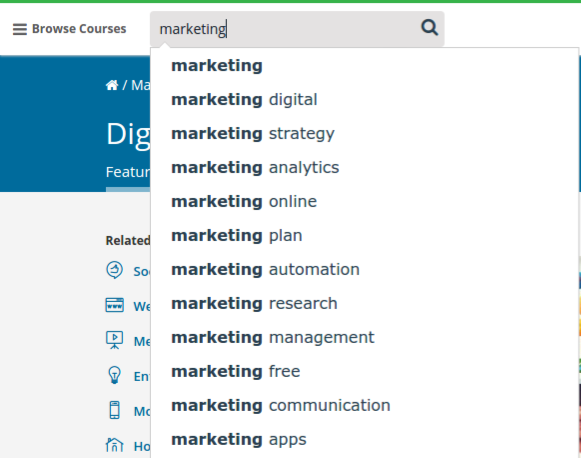
Add each suggestion to your sheet. Then seed the tool with those suggestions to reveal even more.
Example: typing “marketing free…” surfaced “marketing freelance,” which is a different intent path worth exploring.
Find the questions your readers are asking
The best keywords come directly from your audience.
Finding them used to be hard. Today you have several reliable sources.
Here are multiple ways to mine real questions and convert them into high-intent keyword ideas.
Option 1 – Faqfox
Faqfox aggregates threads from forums and Q&A sources to generate content and keyword ideas.
Enter a seed keyword, pick a starter site set (or add your own forum URLs), and run the search.
The tool returns a long list of thread titles you can scan for recurring pains, verbs, and entities.
If you can’t find a niche category, choose “generic” to include major communities (e.g., Reddit).
Run the search to get a long list of relevant threads.
Pull out phrases and full questions you can target with helpful content:
From a quick pass you might collect:
- which email marketing service should we use
- gmail emails going to spam/junk
- best video marketing platforms
- how to get a job in advertising
- taking over webmaster responsibilities
- free online marketing tools
Each can seed a full article, guide, or FAQ section.
Option 2 – Mine Google Search Console (GSC)
Nothing beats your own data. In GSC’s Search results report, switch to the Queries tab and:
- Filter by New queries (compare to previous period) to find emergent topics.
- Sort by Impressions with low CTR to identify pages that need better titles/descriptions or intent realignment.
- Use regex filters for “how|what|why|best|near me|vs|review” to cluster by intent.
- Open the Pages tab for a query to see which URL gets impressions; create a focused article if intent differs.
Steal your competitor’s accidental keywords
Big sites publish so much that they unintentionally rank for queries they never tried to own.
They might mention a phrase in a headline or a few times in the body and still show up.
You probably can’t out-rank them on their head terms. But those “accidental” rankings? You can take those with targeted content.
Create something more focused and useful around those exact phrases and you’ll often outrank their generic page.
Use this method alongside others for a balanced pipeline of ideas.
Step 1 – Use Google’s Keyword Planner
In Keyword Planner, paste a competitor’s URL into “Use a website to get keyword ideas.” Leave the keyword box blank. The home/blog URL usually works best.
Google will return hundreds of associated keywords sorted by relevance.
You can also paste URLs of category or subtopic posts to get tighter lists aligned to your niche (e.g., a social media hub page for social terms).
This uncovers ideas that wouldn’t appear from a generic seed like “marketing.”
Download everything. Shortlist promising phrases and add them to your master sheet.
Step 2 – Plug these keywords into a rank tracking tool
The goal is to find keywords that are already ranking on page 1–2 for the competitor without focused optimization—those are ripe for takeover.
Association > ranking. Check positions manually or use a rank tracker.
Use any reliable tracker (e.g., AccuRanker, STAT, Pro Rank Tracker) to see where they rank without using the exact term in their title—your targeted page can beat them.
Save, let it run, then view rankings by URL to see where they’re weakly ranking.
Prioritize phrases where they rank on pages 1–2 without using the exact term in their title—your targeted page can beat them.
Don’t put all your eggs in one basket
Every tool has blind spots.
To build a complete list, use multiple sources and methods.
Now that you’ve collected a large set of candidates, expand them in a keyword tool that mines autosuggest, questions, and modifiers—great for surfacing long-tails your competitors miss.
Here are a few options.
Keywordtool.io
Autosuggest is powerful—especially Google’s. This tool appends letters and words to your seed and collects suggestions across engines.
Enter a seed from your sheet and run it.
You’ll get a large list of suggestions to filter, group, and prioritize.
Not every idea will fit, but you’ll find plenty worth testing.
Similar tools apply the same approach, e.g., Ubersuggest.
Keyword research and competition go hand in hand
Research yields hundreds or thousands of candidates.
It’s useless until you weigh competition and intent.
If authoritative players have fully optimized pages for a term—and the SERP is stacked with brands—skip it and find an angle you can own.
Evaluating SERPs (page types, intent mix, freshness, People Also Ask, video packs) is a separate skill, but critical.
Most tools estimate difficulty. Use those as directional signals, then verify manually.
If you apply the methods above, you’ll end up with easier, intent-aligned keywords than the generic lists everyone else uses from Keyword Planner.
Beyond Google Ads Keyword Research
Many teams start and stop with Google data. Broaden your sources to validate demand and discover angles others miss.
Bing
Microsoft’s ecosystem offers helpful corroboration. In Bing Webmaster Tools, the Keyword Research report provides trends, time-window filtering, related topics, and question variants. In Microsoft Advertising, the planner can surface additional ideas and estimates from Bing’s network.
Sign in (or create an account), choose your market and date range, and compare against Google estimates to triangulate demand.
Use longer ranges (e.g., six months) to smooth anomalies and identify seasonality and rising topics.
When precision matters, narrow the window and focus on exact phrases rather than broad variants to judge long-tail viability.
YouTube Keyword Tools
Even if you’re not producing video, YouTube suggestions and the Research tab in YouTube Studio surface real questions. Video SERPs are common—use these ideas to create both articles and videos where it makes sense.
At the bottom of many tools you can bulk-add suggestions and export a CSV for clustering.
Want to rank on YouTube for “search marketing”? Reverse-engineer winners.
- Search “search marketing” on YouTube.
- Open the top video and analyze its title, description, and themes.
- Drop the URL into a research tool that reveals associated queries and topics, then build content to match that intent.
Local keyword sources
Use local generators to produce city/ZIP modifiers at scale. Pair them with Google Maps autocomplete ideas and Business Profile Insights for validation.
Start with a ZIP code, radius, and seed keywords, then export to CSV for deduping and volume checks.
Use Google Trends
Google Trends is excellent for seasonality, regional interest, and rising topics you can publish ahead of peak demand.
Additional Topic Ideas
Say you’re a food blogger who occasionally covers red wine. Search “red wine” in Trends to see related rising topics you can pair—like cheeses, regions, and varietals—then plan content for peak months.
You might see cheese-related searches climbing alongside wine—expected, but you’ll uncover specific pairings and questions you hadn’t considered.
Because these trend with red wine, you can time your content calendar to align with seasonal spikes.
Expand the list and export CSVs for planning and clustering.
Ideas By Location
Use the location filter to target regions where interest is concentrated. This is powerful for seasonal niches and for tailoring examples and product picks by market.
Example: an ecommerce grill brand might track “outdoor party” or “bbq recipes” by state to plan campaigns around local peaks.
Tracking Internal Site Search
One of the best places to find keywords is your own site—specifically, what visitors search for after they arrive. These terms reveal content gaps and conversion blockers.
This shines on larger sites (ecommerce, media) with enough internal search volume to analyze patterns.
Assuming you already have on-site search, here’s how to capture and use the data in analytics.
Check How Your Site Does a Site Search
You need the query parameter your site uses for search terms.
For example, a search URL might look like:

Find the parameter after the “?” in the URL.
/search.php?search=search+example
Here, “search” is the parameter, and “search example” is the query string users typed.
The parameter is “search.”
Set It Up in Analytics
In GA4, enable enhanced measurement for site search and ensure your site passes the query to the view_search_results event as search_term. You can also map custom parameters if your query string uses a different key.
Open Admin, confirm enhanced measurement is on for your Web data stream, and add any needed query parameter mappings so GA4 captures the term correctly.
In reporting, build an exploration using the “search_term” dimension with metrics like total users, engagement rate, and exits after search to spot opportunity.
How To Use The Data
Here’s a quick way to prioritize content from internal search data in GA4 (or export for deeper analysis).
First—view site search keywords
Use at least a six-month window to smooth noise and expose patterns.
Apply filters to find high-opportunity terms. Example filter: “search terms with above-median searches and high exits after search.” These indicate content gaps—create or improve pages to answer those queries.
You might see something like this:

Flip the lens and find “high-volume terms with strong engagement.” These reveal topics where you already satisfy intent—double down with related pages and internal links to strengthen topical authority.
Take Action
Turn insights into a publishing plan:
- High searches + high exits = create or significantly improve content for those terms.
- High searches + strong engagement = expand clusters and interlink to related guides, tools, and FAQs.
Turn keywords into genuinely helpful content
Once you’ve chosen targets, build pages that satisfy intent and demonstrate expertise:
- Cover the whole job-to-be-done: include steps, pitfalls, examples, and decision criteria—not just definitions.
- Show experience: add first-hand screenshots, short videos or gifs, benchmarks, and outcomes.
- Structure for scanners: descriptive H2/H3s, jump links, TL;DR, and clear takeaways.
- Establish credibility: author bylines, topical expertise, and cite trusted sources where appropriate.
- Build clusters: interlink related guides and tools, and create a hub page that explains the topic and links out.
- Refresh regularly: review top URLs quarterly for accuracy, new SERP features, and updated examples.